React Conf 2024に参加してから、もう1週間が経った。
先週はラスベガスにいたのに、今は駅前のカフェでこの記事を書いている。
カンファレンスの大きなテーマの一つであった、React-Forgetとして知られていたReact Compilerが公開された。
Open-source React Compiler by josephsavona · Pull Request #29061 · react/react
React Compiler is open source!
https://github.com/facebook/react/pull/29061このコンパイラは魔法のように、私たちのReactコードを「いい感じに」メモ化してくれる。
Reactコアチームは、どれほど長い間修行を積んだら、こんな魔法を使えるようになったのだろうか?
Reactチームはかなり前からコンパイラに関心を持っていたという。(React向けのコンパイラではないが)その痕跡は以下のようなプロジェクトから垣間見ることができる。
GitHub - facebookarchive/prepack: A JavaScript bundle optimizer.
A JavaScript bundle optimizer. Contribute to facebookarchive/prepack development by creating an account on GitHub.
https://github.com/facebookarchive/prepackPrepack · Partial evaluator for JavaScript
No description available
https://prepack.io/今回のシリーズでは、React Compilerについて深く掘り下げてみたい。
Babelプラグインを通じたエントリーポイント、コンパイルの過程、メモ化、そして未来まで、順を追って見ていこう。
React Compiler
React Compiler – React
The library for web and native user interfaces
https://react.dev/learn/react-compiler
コンパイラが公開されてまだ間もないため、公式ドキュメントも更新される余地がある。詳しい説明は公式ドキュメントを参照してほしい。
現在、ReactコンパイラはBabelプラグインを通じて使用できる。
https://github.com/facebook/react/tree/main/compiler/packages/babel-plugin-react-compiler
私たちもこのエントリーポイントを通じて、コンパイラの中に入っていこう。
エントリーポイント(EntryPoint)
React CompilerはBabelプラグインを通じてコンパイルを開始する。
エントリーポイントであるBabelPluginReactCompiler関数は、Babelを通じてProgramノードを見つけてコンパイルを開始する。
ここでcompileProgram関数が呼び出され、コンパイルプロセスが始まる。
// react/compiler/packages/babel-plugin-react-compiler/src/Babel/BabelPlugin.ts
import type * as BabelCore from "@babel/core";
// ...
/*
 * The React Forget Babel Plugin
 * @param {*} _babel
 * @returns
 */
export default function BabelPluginReactCompiler(
  _babel: typeof BabelCore
): BabelCore.PluginObj {
  return {
    name: "react-forget",
    visitor: {
      /*
       * Note: Babel does some "smart" merging of visitors across plugins, so even if A is inserted
       * prior to B, if A does not have a Program visitor and B does, B will run first. We always
       * want Forget to run true to source as possible.
       */
      Program(prog, pass): void {
        // ...
        compileProgram(prog, {
          opts,
          filename: pass.filename ?? null,
          comments: pass.file.ast.comments ?? [],
          code: pass.file.code,
        });
      },
    },
  };
}
まずはBabelについてはブラックボックスとして考え、compileProgram関数を見ていこう。
Program
コード自体が長いため、動作順序に沿って区切りながら見ていこう。
最上位ノードからcompileProgramが実行されると、以下のようなことが行われる。
// react/compiler/packages/babel-plugin-react-compiler/src/EntryPoint/Program.ts
export function compileProgram(
  program: NodePath<t.Program>,
  pass: CompilerPass
): void {
  // Top level "use no forget", skip this file entirely
  if (
    findDirectiveDisablingMemoization(program.node.directives, options) != null
  ) {
    return;
  }
  //...

}
function findDirectiveDisablingMemoization(
directives: Array<t.Directive>,
options: PluginOptions
): t.Directive | null {
for (const directive of directives) {
const directiveValue = directive.value.value;
if (
(directiveValue === "use no forget" ||
directiveValue === "use no memo") &&
!options.ignoreUseNoForget
) {
return directive;
}
}
return null;
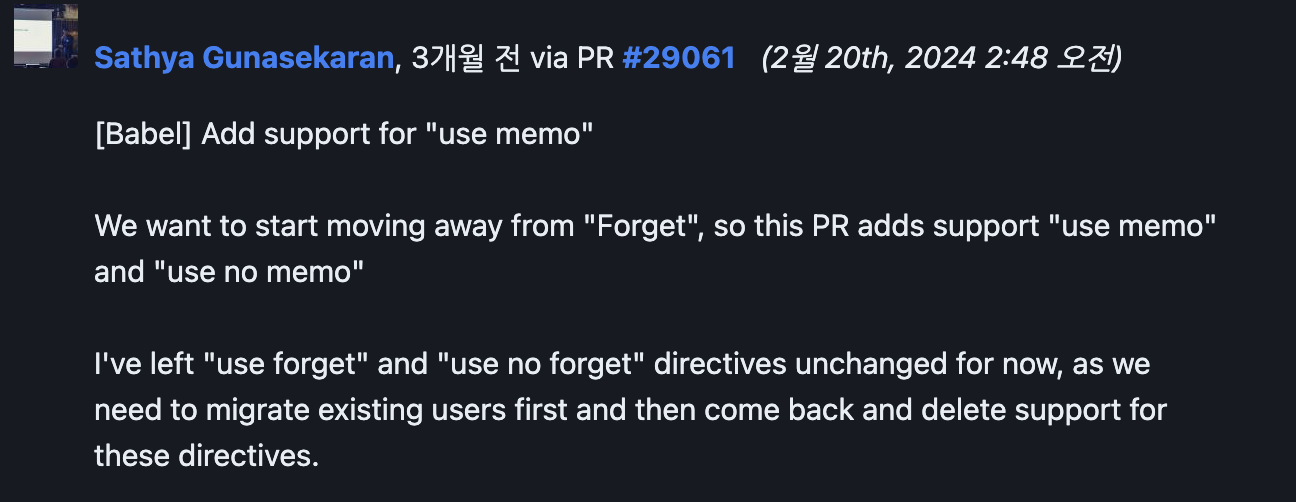
}まず最上位ノードに「use no forget」または「use no memo」といったディレクティブがあるかを確認し、存在する場合はコンパイルを行わない。 forgetはコンパイラの以前の名前であったため、より直感的な形のディレクティブに移行しているとのことだ。
1. ノード走査(program.traverse)
programノードを起点に走査しながらコンパイルを進行する。
// react/compiler/packages/babel-plugin-react-compiler/src/EntryPoint/Program.ts
// ...
export function compileProgram(
  program: NodePath<t.Program>,
  pass: CompilerPass
): void {
  //...
  // Main traversal to compile with Forget
  // Forgetを通じたコンパイルのためのメイン走査
  program.traverse(
    {
      ClassDeclaration(node: NodePath<t.ClassDeclaration>) {
        node.skip(); // スキップ!
        return;
      },

      ClassExpression(node: NodePath<t.ClassExpression>) {
        node.skip(); // スキップ!
        return;
      },

      FunctionDeclaration: traverseFunction,

      FunctionExpression: traverseFunction,

      ArrowFunctionExpression: traverseFunction,
    },
    {
      ...pass,
      opts: { ...pass.opts, ...options },
      filename: pass.filename ?? null,
    }
  );
// ...program.traverseメソッドは2つの引数を受け取り、1つ目はノードに対する動作を定義したオブジェクトである。
この部分で、コンパイラがどの要素をスキップし、どの要素をコンパイルするのかが分かる。
ClassDeclarationとClassExpression:クラス内部に定義された関数はthisを参照できるため、コンパイルに対して安全ではない。
そのため、これらのノードに遭遇した場合はnode.skip()を呼び出して内部を訪問せずスキップする。FunctionDeclaration、FunctionExpression、ArrowFunctionExpression:これらのノードはすべてtraverseFunctionという関数を通じて処理される。
ここまで見ただけでも分かることは、React Compilerは関数に対してのみコンパイルを行うということである。
2. 走査関数(traverseFunction)
// react/compiler/packages/babel-plugin-react-compiler/src/EntryPoint/Program.ts
// ...
export function compileProgram(
  program: NodePath<t.Program>,
  pass: CompilerPass
): void {
  //...
  const compiledFns: Array<CompileResult> = [];

  //...
    const traverseFunction = (fn: BabelFn, pass: CompilerPass): void => {
    /*
    * getReactFunctionType
    * リターン型:ReactFunctionType ("Component" | "Hook" | "Other")
    */
    const fnType = getReactFunctionType(fn, pass);  // 関数のタイプを識別する。
    if (fnType === null || ALREADY_COMPILED.has(fn.node)) { // すでにコンパイル済みの関数かを確認
      return;
    }
    /*
     * 新しいFunctionDeclarationノードを生成する可能性があるため、これをスキップする必要がある。
     * そうしないと無限ループが発生する可能性がある。
     * 元の関数を再訪問しないようにする必要がある。
     */
    ALREADY_COMPILED.add(fn.node); // コンパイル済みとしてマーク
    fn.skip(); // 関数を訪問しないようスキップ

    let compiledFn: CodegenFunction;
    // ...

    compiledFn = compileFn(
      fn,
      config,
      fnType,
      useMemoCacheIdentifier.name,
      options.logger,
      pass.filename,
      pass.code
    );
    // ...

    compiledFns.push({ originalFn: fn, compiledFn });
};関数に対するコンパイルを行うtraverseFunction関数である。
まずgetReactFunctionTypeを通じて、Reactの基準でどのタイプの関数なのかを識別する。
ここでタイプ自体はそれほど重要ではないが、nullの場合はコンパイルを行わない。
compileFnを通じてコンパイルされた結果物と元の関数はcompiledFns配列に追加される。
次に進む前に、どのような場合にコンパイルを行わないのか、getReactFunctionTypeの内部を見ていこう。
1. 関数に「use no forget」「use no memo」ディレクティブがある場合、コンパイルを行わない。
上で見たfindDirectiveDisablingMemoization関数を通じてディレクティブを確認する。
// getReactFunctionType
const useNoForget = findDirectiveDisablingMemoization(
  fn.node.body.directives,
  pass.opts
); // 'use no forget' | 'use no memo' | null
if (useNoForget != null) {
  return null;
}
1.1 use forget、use memoがある場合、すぐに識別してリターンする。
// getReactFunctionType
  if (findDirectiveEnablingMemoization(fn.node.body.directives) != null) {
    // 'use forget' | 'use memo' の場合
    return getComponentOrHookLike(fn, hookPattern) ?? "Other";
  }
2. コンパイルモードがannotationの場合、コンパイルを行わない(ディレクティブを通じてコンパイルを有効化する場合)。
// getReactFunctionType
switch (pass.opts.compilationMode) {
  case "annotation": {
    // opt-ins are checked above
    // オプトインは上で確認済み
    return null;
  }
3. コンパイルモードがinferの場合、コンポーネントとフックを識別する(デフォルトモードがinferである)。
// getReactFunctionType
switch (pass.opts.compilationMode) {
  case "infer": {
    // Component and hook declarations are known components/hooks
    if (fn.isFunctionDeclaration()) {
      if (isComponentDeclaration(fn.node)) {
        return "Component";
      } else if (isHookDeclaration(fn.node)) {
        return "Hook";
      }
    }

    // Otherwise check if this is a component or hook-like function
    return getComponentOrHookLike(fn, hookPattern);
    }
4. コンパイルモードがallの場合、トップレベルの関数のみコンパイルする。
// getReactFunctionType
switch (pass.opts.compilationMode) {
  case "all": {
    // Compile only top level functions
    if (fn.scope.getProgramParent() !== fn.scope.parent) {
      return null;
    }

    return getComponentOrHookLike(fn, hookPattern) ?? "Other";
  }
3. コンパイル済み関数への置き換え
// react/compiler/packages/babel-plugin-react-compiler/src/EntryPoint/Program.ts
// ...
export function compileProgram(
  program: NodePath<t.Program>,
  pass: CompilerPass
): void {
  //...
  /*
   * Only insert Forget-ified functions if we have not encountered a critical
   * error elsewhere in the file, regardless of bailout mode.
   */
  /*
    * ベイルアウトモードに関係なく、ファイル内の他の箇所で致命的なエラーに遭遇していない場合にのみ、
    * Forget化された関数を挿入する。
    */
  for (const { originalFn, compiledFn } of compiledFns) {
    const transformedFn = createNewFunctionNode(originalFn, compiledFn);

    if (gating != null) {
      insertGatedFunctionDeclaration(originalFn, transformedFn, gating);
    } else {
      originalFn.replaceWith(transformedFn);
    }
}compiledFns配列に格納されたコンパイル済み関数と元の関数をcreateNewFunctionNodeに渡し、新しい関数ノードを生成して置き換える。
以下のcreateNewFunctionNodeの内部ロジックはシンプルだ。各ノードタイプに応じて、一部の元のノード情報とともに新しいノードを生成する。
そしてコンパイル済み関数を訪問済みとしてマークする。
// react/compiler/packages/babel-plugin-react-compiler/src/EntryPoint/Program.ts

export function createNewFunctionNode(
  originalFn: BabelFn,
  compiledFn: CodegenFunction
): t.FunctionDeclaration | t.ArrowFunctionExpression | t.FunctionExpression {
  let transformedFn:
    | t.FunctionDeclaration
    | t.ArrowFunctionExpression
    | t.FunctionExpression;
  switch (originalFn.node.type) {
    case "FunctionDeclaration": {
      const fn: t.FunctionDeclaration = {
        type: "FunctionDeclaration",
        id: compiledFn.id,
        loc: originalFn.node.loc ?? null,
        async: compiledFn.async,
        generator: compiledFn.generator,
        params: compiledFn.params,
        body: compiledFn.body,
      };
      transformedFn = fn;
      break;
    }
    case "ArrowFunctionExpression": {
      const fn: t.ArrowFunctionExpression = {
        //...
      };
      transformedFn = fn;
      break;
    }
    case "FunctionExpression": {
      const fn: t.FunctionExpression = {
        //...
      };
      transformedFn = fn;
      break;
    }
  }

  // Avoid visiting the new transformed version
  // 新しい変換バージョンを訪問しないようにする。
  ALREADY_COMPILED.add(transformedFn);
  return transformedFn;
}
4. importの更新
コンパイルされた関数の中でメモ化されたものがあれば、useMemoCacheをインポートするようにするロジックが最後にある。
useMemoCacheはコンパイルされた関数がメモ化を使用する際に必要な関数である。
そのため、これが使用される箇所に「import」文を追加してやるということだ。
//...
const useMemoCacheIdentifier = program.scope.generateUidIdentifier("c");
const moduleName = options.runtimeModule ?? "react/compiler-runtime";

//...
// Forget compiled the component, we need to update existing imports of useMemoCache
// Forgetがコンポーネントをコンパイルしたため、useMemoCacheの既存インポートを更新する必要がある。
if (compiledFns.length > 0) { // コンパイルされた関数がある場合
let needsMemoCacheFunctionImport = false; // useMemoCache関数のインポートが必要かどうか
for (const fn of compiledFns) { // コンパイルされた関数を走査し
  if (fn.compiledFn.memoSlotsUsed > 0) { // memoSlotsUsedが0より大きければ(メモ化を使用しているなら)
    needsMemoCacheFunctionImport = true; // useMemoCache関数のインポートが必要
    break;
  }
}

if (needsMemoCacheFunctionImport) { // useMemoCache関数のインポートが必要なら
  updateMemoCacheFunctionImport( // useMemoCache関数のインポートを更新する。
    program,
    moduleName,
    useMemoCacheIdentifier.name
  );
}
addImportsToProgram(program, externalFunctions);
}「import」を追加するために呼び出されるupdateMemoCacheFunctionImportの引数であるmoduleNameとuseMemoCacheIdentifierを見てみよう。
const useMemoCacheIdentifier = program.scope.generateUidIdentifier("c");
const moduleName = options.runtimeModule ?? "react/compiler-runtime";generateUidIdentifierはBabelのメソッドである。これを通じて一意な識別子を生成する。
この場合はcという識別子を生成しているが、重複する場合は_c、_c2のように番号を付けて生成される。参考
moduleNameはoptions.runtimeModuleがなければreact/compiler-runtimeを使用する。
options.runtimeModuleのデフォルト値はnullである。
少しオプションを見てみよう。
// react/compiler/packages/babel-plugin-react-compiler/src/EntryPoint/Options.ts
export type PluginOptions = {
  // ...
  /*
   * 有効にすると、Forgetは`react/compiler-runtime`の代わりに
   * 指定されたモジュールから`useMemoCache`をインポートする。
   *
   * ```
   * // If set to "react-compiler-runtime"
   * import {c as useMemoCache} from 'react-compiler-runtime';
   * ```
   */
  runtimeModule?: string | null | undefined;
}

export const defaultOptions: PluginOptions = {
  compilationMode: "infer",
  runtimeModule: null,
  // ...
} as const;再びupdateMemoCacheFunctionImportを見てみよう。
// react/compiler/packages/babel-plugin-react-compiler/src/EntryPoint/Imports.ts
export function updateMemoCacheFunctionImport(
  program: NodePath<t.Program>,
  moduleName: string,
  useMemoCacheIdentifier: string
): void {
  /*
   * If there isn't already an import of * as React, insert it so useMemoCache doesn't
   * throw
   */
  /*
   * すでに* as Reactとしてのインポートがなければ、useMemoCacheがthrowしないように挿入する。
   */
  const hasExistingImport = hasExistingNonNamespacedImportOfModule(
    program,
    moduleName
  );

  if (hasExistingImport) {
    // 既存のインポートにuseMemoCache関数を追加する。
    const didUpdateImport = addMemoCacheFunctionSpecifierToExistingImport(
      program,
      moduleName,
      useMemoCacheIdentifier
    );
    if (!didUpdateImport) {
      throw new Error(
        `Expected an ImportDeclaration of \`${moduleName}\` in order to update ImportSpecifiers with useMemoCache`
      );
    }
  } else {
    // 新しいインポートを追加する。
    addMemoCacheFunctionImportDeclaration(
      program,
      moduleName,
      useMemoCacheIdentifier
    );
  }
}

function addMemoCacheFunctionImportDeclaration(
  program: NodePath<t.Program>,
  moduleName: string,
  localName: string
): void {
  program.unshiftContainer(
    "body",
    t.importDeclaration(
      [t.importSpecifier(t.identifier(localName), t.identifier("c"))],
      t.stringLiteral(moduleName)
    )
  );
}
実質的に「import」文が追加される部分を見ると
t.importDeclaration(
  [t.importSpecifier(t.identifier(localName), t.identifier("c"))],
  t.stringLiteral(moduleName)
)localNameには渡されたuseMemoCacheIdentifierである「_c」が入り、moduleNameにはreact/compiler-runtimeが入る。
こうしてこの部分を経て
import { c as _c } from "react/compiler-runtime";のような形に更新される。
しかし、なぜキーワードとしてはuseMemoCacheを言及してきたのに、useMemoCacheではなくcをインポートするのだろうか?
これを追跡するにはreact/compiler-runtimeを見る必要がある。
他の部分とは異なり、コンパイラパッケージ内部からではなくreactパッケージからインポートしている。Reactの方に入って見てみよう。
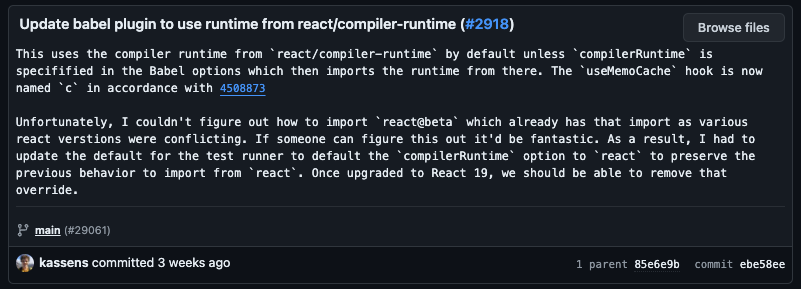
react/compiler-runtimeを利用するよう修正したcommit// react/compiler-runtime.js
export {useMemoCache as c} from './src/ReactHooks';useMemoCacheをcとしてエクスポートしている。だからcをインポートするのだ。
これはデフォルト値であり、上で見たようにオプションに応じて別のモジュールからインポートすることもできる。メモ化ロジックの拡張性を念頭に置いたものだろうか?
もう一つのオプションであるreact-compiler-runtimeでの実装も見てみよう。
// packages/react-compiler-runtime/src/index.ts
type MemoCache = Array<number | typeof $empty>;

const $empty = Symbol.for("react.memo_cache_sentinel");
/**
 * DANGER: this hook is NEVER meant to be called directly!
 **/
export function c(size: number) {
  return React.useState(() => {
    const $ = new Array(size);
    for (let ii = 0; ii < size; ii++) {
      $[ii] = $empty;
    }
    // This symbol is added to tell the react devtools that this array is from
    // useMemoCache.
    // @ts-ignore
    $[$empty] = true;
    return $;
  })[0];
}ここでは直接cとしてエクスポートしており、シンプルな実装になっている。
実装を簡単に説明すると、useStateを利用してsize分の配列を生成し、各要素に$emptyというシンボルを入れて初期化する(このシンボルは後にreact-devtoolで使用される)。
そしてこの配列を返す。
ひとまず今はコンパイラの全体的な適用過程を見ているため、この配列がどのように使われるかは後で見ていこう。
コンパイル完了!
これ以上深く入ると迷子になりかねないので、本来の目的であるコンパイラの適用過程をまとめよう。
useMemoCache、別名cに対するimport文を追加することで、compileProgramの動作は終了した。
つまり、Babelプラグインの動作が完了したということだ。
まとめ
Reactコンパイラの適用過程をまとめると以下のようになる。
- Babelプラグインを通じてコンパイラが開始され、最上位ノードであるProgramノードから走査する。
- 関数ノードの中からReactコンポーネントとフックに該当する関数を識別し、それらに対してコンパイルを実行する。
- コンパイル過程でメモ化などの最適化が適用され、コンパイルされた関数は元の関数とともに保存される。
- コンパイルが完了した後、コンパイルされた関数で元の関数を置き換える。
- 最後に、メモ化が適用された関数があれば、useMemoCache関数のimport文を自動的に追加する。
コンパイル結果物の味見
では、コンパイルされたコードを確認してみよう。
コンパイル過程を見るためにReact Compiler Playgroundを実行してコードを入れてみた。
function Component({ color }) {
  return <div styles={{color}}>hello world</div>;
}

export default function MyApp() {
  const color= "red"
  return (
      <Component color={color} />
  )
}
このコードを入れてみたところ、次のようなコンパイル結果を確認できた。
function Component(t0) {
  const $ = _c(2);

  const { color } = t0;
  let t1;

  if ($[0] !== color) {
    t1 = (
      <div
        styles={{
          color,
        }}
      >
        hello world
      </div>
    );
    $[0] = color;
    $[1] = t1;
  } else {
    t1 = $[1];
  }

  return t1;
}

function MyApp() {
  const $ = _c(1);

  let t0;

  if ($[0] === Symbol.for("react.memo_cache_sentinel")) {
    t0 = <Component color="red" />;
    $[0] = t0;
  } else {
    t0 = $[0];
  }

  return t0;
}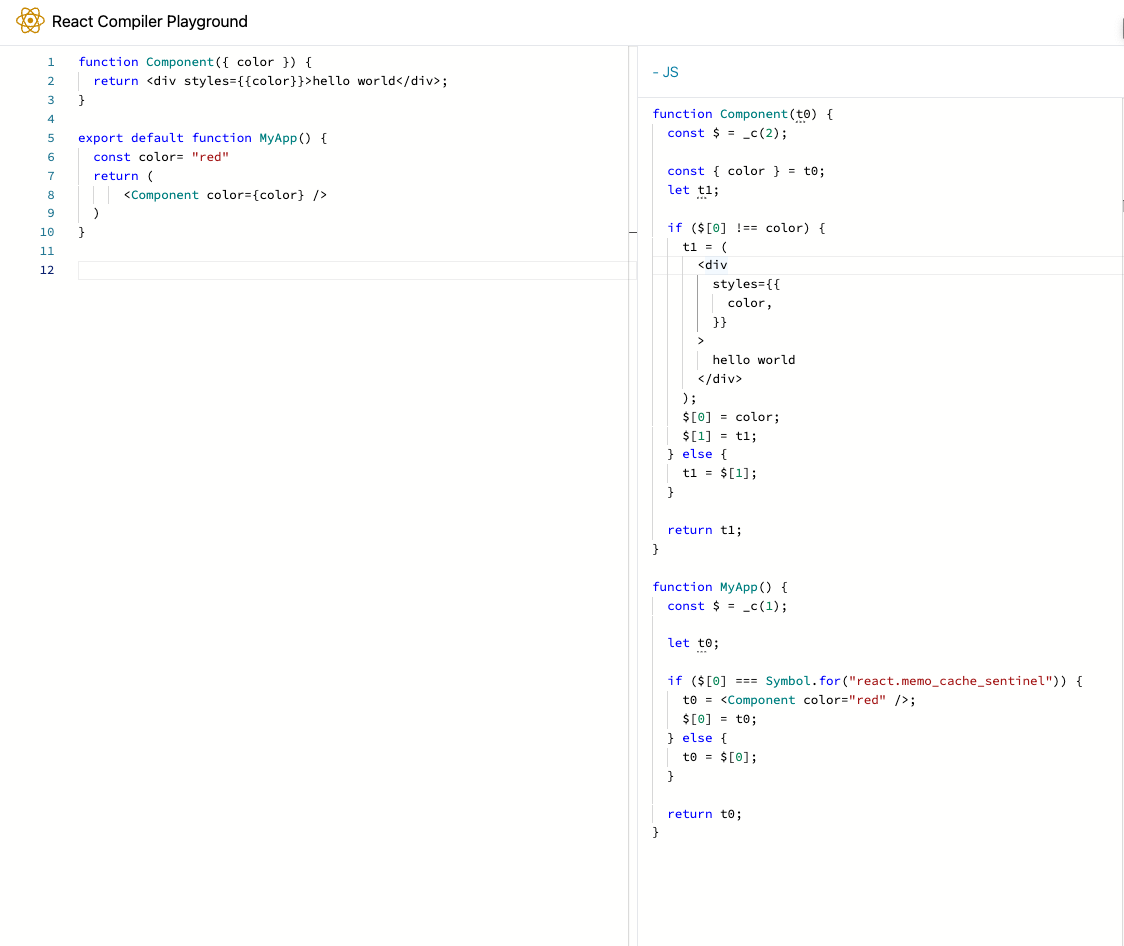
コンパイル結果の分析は次回に行うとして、今日扱った内容を中心に見てみよう。
おお、先ほど見たコードが見えるだろうか?
各コンポーネントがuseMemoCache(_c)というメモ化関数を呼び出している。
まだ少しだが、コンパイラの結果物に対する視野が広がった気がする。
私たちの旅はここで一旦休憩としよう。
次回はuseMemoCacheの動作とコンパイル過程について、さらに深く見ていこう。
[深掘り] ところで、なぜここには上で長々と見たimport文がないのだろうか?
これを調べるには、Playgroundのコードを見てみよう。
// compiler/apps/playground/components/Editor/EditorImpl.tsx

import {
  //...
  run,
} from "babel-plugin-react-compiler/src";
  // ...
function compile(source: string): CompilerOutput {
  // ...
    for (const result of run(
    fn,
    {
      ...config,
      customHooks: new Map([...COMMON_HOOKS]),
    },
    getReactFunctionType(id),
    "_c",
    null,
    null,
    null,
  )) {
    // ...
  }
}


export default function Editor() {
  // ...
  const compilerOutput =compile(deferredStore.source)
  // ...
}先ほど見た構文はcompileProgramレベルで実行されるが、Playgroundではrun関数を通じて実行されている。
run関数はcompileProgramの過程中、コンパイル過程であるcompileFnが実行する関数だ。
実質的にコンパイルを実行する部分である。
// compiler/packages/babel-plugin-react-compiler/src/Entrypoint/Pipeline.ts

export function compileFn(
  func: NodePath<
    t.FunctionDeclaration | t.ArrowFunctionExpression | t.FunctionExpression
  >,
  config: EnvironmentConfig,
  fnType: ReactFunctionType,
  useMemoCacheIdentifier: string,
  logger: Logger | null,
  filename: string | null,
  code: string | null
): CodegenFunction {
  let generator = run(
    func,
    config,
    fnType,
    useMemoCacheIdentifier,
    logger,
    filename,
    code
  );
  while (true) {
    const next = generator.next();
    if (next.done) {
      return next.value;
    }
  }
}
この部分については次回さらに深く見ていこう。
そのため、import文が表示されないのだ。
先ほど見たように実行されるなら、以下のような結果物になるはずだ。
import { c as _c } from "react/compiler-runtime";

function Component(t0) {
  const $ = _c(2);

  const { color } = t0;
  let t1;

  if ($[0] !== color) {
    t1 = (
      <div
        styles={{
          color,
        }}
      >
        hello world
      </div>
    );
    $[0] = color;
    $[1] = t1;
  } else {
    t1 = $[1];
  }

  return t1;
}
// ...
今日はこれ以上ディープダイブするエネルギーがない。それでは!