useEffectEvent는 흑마법이다. 그럴까?
React 19.2 와함께 stable된 useEffectEvent이 무엇이고, 왜 등장했는지, 그리고 앞으로는 어떻게 사용해야할지 알아보도록 하자.
useEffectEvent란?
useEffectEvent에 대해서는 문서에도 설명은 잘 되어있다. 문서를 인용해보면
## Usage
Reading the latest props and state
Typically, when you access a reactive value inside an Effect, you must include it in the dependency array. This makes sure your Effect runs again whenever that value changes, which is usually the desired behavior.

But in some cases, you may want to read the most recent props or state inside an Effect without causing the Effect to re-run when those values change.

To read the latest props or state in your Effect, without making those values reactive, include them in an Effect Event.

## 사용법
최신 props와 state 읽기
일반적으로 Effect 내부에서 반응형 값을 액세스할 때 해당 값을 종속성 배열에 포함해야 합니다. 이렇게 하면 해당 값이 변경될 때마다 Effect가 다시 실행되어 원하는 동작이 됩니다.
그러나 경우에 따라 이러한 값이 변경될 때 Effect가 다시 실행되지 않고 Effect 내부에서 최신 props 또는 state를 읽고 싶을 수 있습니다.
Effect에서 최신 props 또는 state를 읽으려면 해당 값을 Effect Event에 포함하세요.
위와같은 설명으로 되어있다. useEffect내부에서 사용하는 함수가 최신의 값을 이용할 수 있도록 래핑해주는 훅인 것이다.
직관적으로 와닿지 않을 수 있다. 문서속 예제를 통해 문제 케이스를 간단하게 먼저 살펴보자.
useEffectEvent가 필요한 이유
좀 더 직관적인 이해를 돕기 위해 예제를 조금 변형해보았다.
케이스 1. 의존성을 다 넣어준 경우
function ChatRoom({ roomId, theme }) {
  useEffect(() => {
    const connection = createConnection(serverUrl, roomId);
    connection.on("connected", () => {
      showNotification("연결 성공!", theme);
    });
    connection.connect();
    return () => {
      showNotification("연결 끊김!", theme);
      connection.disconnect();
    };
  }, [roomId, theme]);

  return <h1>환영합니다 {roomId} 채팅방에 오신걸!!</h1>;
}useEffect는 외부와의 동기화를 위해 보통 사용된다. 위의 케이스의 경우에는 채팅방과의 커넥션이다.
우리는 createConnection을 통해 커넥션을 맺고, connection.on을 통해 connected, 즉 연결 되었을때 알림을 띄우도록 되어있다.
그리고 연결이 끊길때도 알림을 띄우도록 해보았다. 알림을 호출할때는 인자로 메시지와 theme을 받는다.
문제는 theme이 바뀌었을때이다. theme이 바뀌면 useEffect가 다시 실행되면서 커넥션을 끊고 다시 연결을 시도한다.
무척이나 비효율적이고 notification의 theme 과 커넥션은 전혀 다른 맥락을 가지고 있다. 그렇다면 이를 어떻게 해결 할 수 있을까?
아래 예제를 통해서 theme 을 전환해보자.
import { useState, useEffect } from "react";
import { createConnection } from "./chat.js";
import { showNotification } from "./notifications.js";

const serverUrl = "https://localhost:1234";

function ChatRoom({ roomId, theme }) {
  useEffect(() => {
    const connection = createConnection(serverUrl, roomId);
    connection.on("connected", () => {
      showNotification("연결 성공!", theme);
    });
    connection.connect();
    return () => {
      showNotification("연결 끊김!", theme);
      connection.disconnect();
    };
  }, [roomId, theme]); // theme이 바뀔 때마다 재연결됨!

  return <h1>환영합니다 {roomId} 채팅방에 오신걸!!</h1>;
}

export default function App() {
  const [roomId, setRoomId] = useState("general");
  const [isDark, setIsDark] = useState(false);
  return (
    <>
      <label>
        Choose the chat room:{" "}
        <select value={roomId} onChange={(e) => setRoomId(e.target.value)}>
          <option value="general">general</option>
          <option value="travel">travel</option>
          <option value="music">music</option>
        </select>
      </label>
      <label>
        <input
          type="checkbox"
          checked={isDark}
          onChange={(e) => setIsDark(e.target.checked)}
        />
        Use dark theme
      </label>
      <hr />
      <ChatRoom roomId={roomId} theme={isDark ? "dark" : "light"} />
    </>
  );
}
(다른 문제도 같이 있는것 같지만 일단 연결 문제에 집중해보자)
theme을 바꿨는데 연결이 다시 이루어지는걸 볼 수 있다.
케이스 2. 룰을 어기고 의존성을 제거한 경우
theme을 useEffect의 의존성 배열에서 제거하면 나아질까?
제거 하게 되는 순간 ‘React Hook useEffect has a missing dependency’ eslint 경고가 뜰 것 이다.
function ChatRoom({ roomId, theme }) {
  useEffect(() => {
    const connection = createConnection(serverUrl, roomId);
    connection.on("connected", () => {
      showNotification("연결 성공!", theme);
    });
    connection.connect();
    return () => {
      showNotification("연결 끊김!", theme);
      connection.disconnect();
    };
    // eslint-disable-next-line
  }, [roomId]);

  return <h1>환영합니다 {roomId} 채팅방에 오신걸!!</h1>;
}
편법이긴하나 이렇게 하면 theme이 바뀌어도 새로운 커넥션을 맺지 않을 것이다. 그러기 위해 우리는 우선 React의 룰을 어겨야했다.
그럼 이것이 문제를 해결해주었을까? 한번 실행해보자.
import { useState, useEffect } from "react";
import { createConnection } from "./chat.js";
import { showNotification } from "./notifications.js";

const serverUrl = "https://localhost:1234";

function ChatRoom({ roomId, theme }) {
  useEffect(() => {
    const connection = createConnection(serverUrl, roomId);
    connection.on("connected", () => {
      showNotification("연결 성공!", theme);
    });
    connection.connect();
    return () => {
      showNotification("연결 끊김!", theme);
      connection.disconnect();
    };
    // eslint-disable-next-line react-hooks/exhaustive-deps
  }, [roomId]); // theme을 빼면 Stale Closure 문제 발생!

  return <h1>환영합니다 {roomId} 채팅방에 오신걸!!</h1>;
}

export default function App() {
  const [roomId, setRoomId] = useState("general");
  const [isDark, setIsDark] = useState(false);
  return (
    <>
      <label>
        Choose the chat room:{" "}
        <select value={roomId} onChange={(e) => setRoomId(e.target.value)}>
          <option value="general">general</option>
          <option value="travel">travel</option>
          <option value="music">music</option>
        </select>
      </label>
      <label>
        <input
          type="checkbox"
          checked={isDark}
          onChange={(e) => setIsDark(e.target.checked)}
        />
        Use dark theme
      </label>
      <hr />
      <ChatRoom roomId={roomId} theme={isDark ? "dark" : "light"} />
    </>
  );
}
theme을 바꾸고 다른 채팅방으로 연결해보았다.
이제 theme을 바꾸어도 커넥션이 새롭게 다시 맺어지지는 않는다. 그렇지만 여전히 문제가 있다. theme을 바꾼뒤 다른 채팅방으로 연결하면
새 연결을 할때 연결끊김알림은 여전히 이전 theme 으로 나타나고 새 연결 성공! 알림은 바뀐 theme으로 나타난다.
케이스 3. useEffectEvent 를 적용한 경우
그렇다면 이번엔 useEffectEvent를 이용해보면 이것이 해소될까?
import { useEffect, useEffectEvent } from "react";

function ChatRoom({ roomId, theme }) {
  const onConnect = useEffectEvent(() => {
    showNotification("연결 성공!", theme);
  }); // useEffectEvent 로 래핑해주었다.
  const onDisconnect = useEffectEvent(() => {
    showNotification("연결 끊김!", theme);
  });

  useEffect(() => {
    const connection = createConnection(serverUrl, roomId);
    connection.on("connected", () => {
      onConnect();
    });
    connection.connect();
    return () => {
      onDisconnect();
      connection.disconnect();
    };
  }, [roomId]);

  return <h1>환영합니다 {roomId} 채팅방에 오신걸!!</h1>;
}
위와 같이 각 핸들러들을 useEffectEvent로 감싸주었다. 그러고 이를 useEffect안에 참조하니 더이상 eslint 경고도 뜨지 않았다.
한번 실행해서 theme 을 바꾼뒤 채팅방을 변경해보자.
import { useState, useEffect } from "react";
import { useEffectEvent } from "react";
import { createConnection } from "./chat.js";
import { showNotification } from "./notifications.js";

const serverUrl = "https://localhost:1234";

function ChatRoom({ roomId, theme }) {
  const onConnect = useEffectEvent(() => {
    showNotification("연결 성공!", theme);
  });
  const onDisconnect = useEffectEvent(() => {
    showNotification("연결 끊김!", theme);
  });

  useEffect(() => {
    const connection = createConnection(serverUrl, roomId);
    connection.on("connected", () => {
      onConnect();
    });
    connection.connect();
    return () => {
      onDisconnect();
      connection.disconnect();
    };
  }, [roomId]); // useEffectEvent로 theme 문제 해결!

  return <h1>환영합니다 {roomId} 채팅방에 오신걸!!</h1>;
}

export default function App() {
  const [roomId, setRoomId] = useState("general");
  const [isDark, setIsDark] = useState(false);
  return (
    <>
      <label>
        Choose the chat room:{" "}
        <select value={roomId} onChange={(e) => setRoomId(e.target.value)}>
          <option value="general">general</option>
          <option value="travel">travel</option>
          <option value="music">music</option>
        </select>
      </label>
      <label>
        <input
          type="checkbox"
          checked={isDark}
          onChange={(e) => setIsDark(e.target.checked)}
        />
        Use dark theme
      </label>
      <hr />
      <ChatRoom roomId={roomId} theme={isDark ? "dark" : "light"} />
    </>
  );
}
오! 의도된 대로 토스트가 최신 theme값에 맞춰서 나오게 된다.
useEffect 내의 코드도 보다 의도가 명확하게 드러나게 roomId 만 변경시 cleanup 된다라고 작성할 수 있게 되었다.
그렇다면 왜 이런 문제가 생길까?
그리고 어떤 방법으로 이를 해결한걸까?
JavaScript가 가진 클로저의 특성 때문이다.
Stale Closure
클로저(Closure)에 대해서는 많이들 알고 있을거라는 가정하에 간단하게 짚고 넘어가자
클로저란?
함수가 생성될 때 외부 스코프의 변수들을 기억하는 특성
으로 정의할 수 있다.
간단한 예제를 통해 클로저의 특성을 살펴보자
function makeCounter() {
  let count = 0;
  return function () {
    count++;
    console.log(count);
  };
}
const counter = makeCounter();
counter(); // 1
counter(); // 2
counter(); // 3
위의 예제에서 makeCounter 함수는 내부에 count 변수를 가지고 있다. 그리고 makeCounter 함수는 내부에 또 다른 함수를 반환한다.
이 반환된 함수는 count 변수를 증가시키고 그 값을 출력한다. 중요한 점은 makeCounter 함수가 호출된 이후에도 반환된 함수가 count 변수에 접근할 수 있다는 것이다.
이는 클로저의 특성 때문이다. makeCounter 함수가 실행될 때, 내부 함수는 count 변수를 기억하고 있기 때문에,
반환된 함수가 호출될 때마다 count 변수에 접근하여 그 값을 증가시키고 출력할 수 있다.
우리의 상황에 비슷한 예제로 한번 더 살펴보자
let theme = "light";

const showMessage = () => {
  console.log(`Current theme: ${theme}`);
};

// theme 변경
theme = "dark";

// 하지만 함수는...
showMessage(); // "Current theme: dark" ✅
// 하지만 이렇게 하면:
let theme = "light";
const captureTheme = theme; // 이 시점의 "값"을 복사
const showMessage = () => {
console.log(`Current theme: ${captureTheme}`); // 복사된 값을 참조
};
theme = "dark";
showMessage(); // "Current theme: light" 😱위의 두 예제의 차이는 무엇인가?
첫 번째 예제에서는 showMessage 함수가 theme 변수를 직접 참조하고 있다. 따라서 theme 변수가 변경되면, showMessage 함수가 호출될 때 최신 값을 출력한다.
반면에 두 번째 예제에서는 captureTheme 변수가 theme 변수의 값을 복사하여 저장하고 있다. 따라서 theme 변수가 변경되더라도, showMessage 함수는 여전히 captureTheme 변수에 저장된 초기 값을 출력하게 된다.
그렇다면 React에서는 이것이 어떻게 적용될까?
React 컴포넌트와 클로저
React 컴포넌트는 결국 JavaScript 함수다. 컴포넌트가 렌더링된다는 것은 그 함수가 호출된다는 것이고, 매 호출마다 새로운 실행 컨텍스트와 함께 지역 변수들이 새로 생성된다.
// 렌더링 1: theme="light"
function ChatRoom({ roomId, theme }) {
  // 이 스코프에서 theme은 "light"
}

// 렌더링 2: theme="dark"
function ChatRoom({ roomId, theme }) {
  // 완전히 새로운 스코프, theme은 "dark"
}
렌더링 1과 렌더링 2는 같은 컴포넌트지만, 각각의 theme은 서로 다른 변수다. 렌더링 1의 theme이 “dark”로 바뀌는 게 아니라, 렌더링 2에서 새로운 theme 변수가 “dark” 값으로 생성되는 것이다.
이제 위에서 살펴봤던 의존성을 의도적으로 제거한 케이스 2를 다시 살펴보자.
function ChatRoom({ roomId, theme }) {
  useEffect(() => {
    const connection = createConnection(serverUrl, roomId);
    connection.on("connected", () => {
      showNotification("연결 성공!", theme);
    });
    connection.connect();
    return () => {
      showNotification("연결 끊김!", theme);
      connection.disconnect();
    };
  }, [roomId]); // theme이 의존성에 없다

  return <h1>환영합니다 {roomId} 채팅방에 오신걸!!</h1>;
}theme을 의존성 배열에서 제거했다. 이제 시나리오를 따라가보자.
렌더링 1: roomId=“general”, theme=“light”
컴포넌트 함수가 호출되면서 새로운 스코프가 생성된다. 이 스코프 안에서:
// 스코프 1
const roomId = "general";
const theme = "light";

const effectFn = () => {
  const connection = createConnection(serverUrl, roomId);
  connection.on("connected", () => {
    showNotification("연결 성공!", theme); // "light" 캡처
  });
  connection.connect();
  return () => {
    showNotification("연결 끊김!", theme); // "light" 캡처
    connection.disconnect();
  };
};
effectFn 안에서 참조하는 theme은 스코프 1의 theme이다. 이 Effect 함수는 실행되고, cleanup 함수가 반환된다. React는 이 cleanup 함수를 내부적으로 저장해둔다.
렌더링 2: roomId=“general”, theme=“dark”
사용자가 테마를 변경했다. 컴포넌트가 다시 렌더링되면서 새로운 스코프가 생성된다.
// 스코프 2
const roomId = "general";
const theme = "dark";

const effectFn = () => {
  // ...
  showNotification("연결 성공!", theme); // "dark" 캡처
  return () => {
    showNotification("연결 끊김!", theme); // "dark" 캡처
  };
};
JavaScript에서 함수 리터럴은 매번 새로운 객체를 생성한다. 따라서 useEffect에 전달되는 화살표 함수는 렌더링마다 새로 만들어진다. 이 새 함수는 스코프 2의 theme(“dark”)을 캡처하고 있다.
하지만 React는 의존성 배열을 비교한다.
// 이전 의존성: ["general"]
// 현재 의존성: ["general"]
// → 같다!
여기서 중요한 일이 일어난다. React 내부에서는 새 Effect 객체가 생성되고 hook.memoizedState에 저장된다. 하지만 의존성이 같기 때문에 HookHasEffect 플래그가 설정되지 않는다.
// React 내부 (updateEffectImpl)
if (areHookInputsEqual(nextDeps, prevDeps)) {
  // 의존성이 같으면: HookHasEffect 플래그 없이 저장
  hook.memoizedState = pushSimpleEffect(
    hookFlags, // HookHasEffect 없음!
    inst, // 기존 inst 재사용 (cleanup이 여기 저장됨)
    create, // 새 Effect 함수 (theme="dark")
    nextDeps
  );
  return;
}
커밋 단계에서 React는 HookHasEffect 플래그를 확인한다.
// React 내부 (commitHookEffectListMount)
if ((effect.tag & HookHasEffect) === HookHasEffect) {
  // 이 조건이 false! 실행되지 않음
  const create = effect.create;
  create(); // ← 호출 안 됨!
}
플래그가 없으므로 새 Effect 함수는 실행되지 않는다. 실행되지 않았으니 새 cleanup도 반환되지 않고, inst.destroy는 업데이트되지 않는다. 렌더링 2의 Effect 함수는 다음 렌더링에서 또 새 Effect 객체가 만들어지면서 덮어씌워진다.
현재 상태:
effect.create: 스코프 2의 함수 (theme=“dark”) — 저장되었지만 실행 안 됨inst.destroy: 스코프 1의 cleanup (theme=“light”) — 그대로 유지!- 실행 중인 connection: 스코프 1에서 생성된 것
렌더링 3: roomId=“random”, theme=“dark”
사용자가 다른 채팅방으로 이동했다. 다시 새로운 스코프가 생성되고, 새 Effect 함수가 만들어진다.
// 스코프 3
const roomId = "random";
const theme = "dark";

const effectFn = () => {
  const connection = createConnection(serverUrl, "random");
  connection.on("connected", () => {
    showNotification("연결 성공!", theme); // "dark" 캡처
  });
  connection.connect();
  return () => {
    showNotification("연결 끊김!", theme); // "dark" 캡처
    connection.disconnect();
  };
};
이번에는 의존성이 다르다.
// 이전 의존성: ["general"]
// 현재 의존성: ["random"]
// → 다르다! HookHasEffect 플래그!
HookHasEffect 플래그가 설정되었으므로 커밋 단계에서 Effect가 실행된다. 순서는 다음과 같다:
1단계: cleanup 실행
React는 먼저 inst.destroy에 저장된 cleanup을 실행한다. 이 cleanup은 렌더링 1에서 만들어진 것이다.
// inst.destroy가 가리키는 함수 (렌더링 1에서 생성됨)
() => {
  showNotification("연결 끊김!", theme); // theme은 스코프 1의 "light"
  connection.disconnect();
};
cleanup이 실행되면 "연결 끊김!" 알림이 “light” 테마로 표시된다. 현재 theme은 “dark”인데 말이다!
2단계: 새 Effect 실행
그 다음 React는 렌더링 3에서 만들어진 Effect 함수를 실행한다.
// effect.create (렌더링 3에서 생성됨)
() => {
  const connection = createConnection(serverUrl, "random");
  connection.on("connected", () => {
    showNotification("연결 성공!", theme); // theme은 스코프 3의 "dark"
  });
  connection.connect();
  return () => {
    /* 새 cleanup */
  };
};
연결이 완료되면 "연결 성공!" 알림이 “dark” 테마로 표시된다.
3단계: 새 cleanup 저장
Effect 함수가 반환한 새 cleanup이 inst.destroy에 저장된다. 이제 inst.destroy는 스코프 3의 cleanup(theme=“dark”)을 가리킨다.
cleanup은 어디에 저장되는가?
여기서 의문이 생길 수 있다. 컴포넌트 함수의 스코프는 함수 실행이 끝나면 사라지는데, cleanup 함수는 어떻게 렌더링 1의 스코프를 계속 가지고 있는 걸까?
답은 React의 Fiber 구조에 있다. 각 컴포넌트 인스턴스마다 Fiber 노드가 있고, 그 안에 Hook들이 링크드 리스트로 연결되어 있다.
Fiber (컴포넌트 인스턴스)
  └─ memoizedState → Hook1 (useState)
                       └─ next → Hook2 (useEffect)
                                   └─ memoizedState: Effect 객체
└─ inst: { destroy: cleanup함수 }useEffect의 경우, Effect 객체 안에 inst라는 객체가 있고, 거기에 destroy 속성으로 cleanup 함수가 저장된다.
// React 소스코드 (ReactFiberHooks.js)
type EffectInstance = {
  destroy: void | (() => void); // cleanup 함수가 여기에 저장
};

type Effect = {
  tag: HookFlags;
  create: () => (() => void) | void; // setup 함수
  inst: EffectInstance; // cleanup을 담는 객체
  deps: Array<mixed> | null;
  next: Effect;
};
cleanup 함수가 inst.destroy에 저장되어 있고, 그 함수가 스코프를 클로저로 캡처하고 있기 때문에 스코프도 가비지 컬렉션되지 않고 살아있다.
Stale Closure가 발생하는 이유
지금까지의 내용을 정리하면:
- JavaScript 클로저: 함수는 생성 시점의 스코프를 캡처한다
- React 렌더링: 매 렌더링마다 지역 변수들이 새로 생성된다 (같은 변수명이지만 다른 변수)
- Effect 재사용: 의존성이 같으면 새 Effect 함수가 만들어지지만 실행되지 않고,
inst.destroy는 이전 cleanup을 계속 가리킨다
이 세 가지가 조합되어 Stale Closure가 발생한다.
| 시점 | 실제 theme | cleanup이 보는 theme |
|---|---|---|
| 렌더링 1 | “light” | “light” |
| 렌더링 2 | “dark” | “light” (업데이트 안 됨) |
| 렌더링 3 cleanup 실행 | “dark” | “light” ← Stale! |
cleanup이 실행되는 시점의 실제 theme은 “dark”인데, cleanup은 “light”를 출력한다. 함수가 캡처한 값과 현재 값이 다른 상황, 이것이 Stale Closure다.
useEffectEvent는 어떻게 해결하는가?
이제 케이스 3에서 useEffectEvent가 이 문제를 어떻게 해결하는지 살펴보자.
function ChatRoom({ roomId, theme }) {
  const onConnect = useEffectEvent(() => {
    showNotification("연결 성공!", theme);
  });
  const onDisconnect = useEffectEvent(() => {
    showNotification("연결 끊김!", theme);
  });

  useEffect(() => {
    const connection = createConnection(serverUrl, roomId);
    connection.on("connected", () => {
      onConnect();
    });
    connection.connect();
    return () => {
      onDisconnect();
      connection.disconnect();
    };
  }, [roomId]);

  return <h1>환영합니다 {roomId} 채팅방에 오신걸!!</h1>;
}
킥 : 객체 래퍼
useEffectEvent의 핵심은 객체를 통한 간접 참조다.
// 직접 함수를 캡처하는 대신
const callback = () => console.log(theme); // theme 값을 캡처

// 객체를 통해 간접 참조
const ref = { impl: callback };
const eventFn = () => ref.impl(); // ref 객체를 캡처 (값이 아닌 참조)eventFn은 ref 객체를 캡처한다. ref 객체 자체는 변하지 않고, ref.impl만 업데이트된다. eventFn을 호출하면 항상 그 시점의 ref.impl을 실행하므로 최신 콜백을 사용할 수 있다.
왜 이 패턴이 작동할까? JavaScript 엔진(V8) 관점에서 보면, 클로저는 외부 변수를 Context 슬롯에 저장한다. Primitive 값은 슬롯에 직접 복사되지만, 객체는 힙 메모리의 포인터가 저장된다.
클로저의 Context:
┌─────────────────────┐
│ slot[0]: 0x7f3a... ─┼──→ { impl: callback }
└─────────────────────┘       ↑
                              └── 포인터는 불변, impl 속성만 변경
ref.impl = newCallback은 Context 슬롯을 건드리지 않고 힙에 있는 객체의 속성만 변경한다. 따라서 클로저가 언제 실행되든 ref.impl()은 그 시점의 최신 함수를 호출하게 된다.
React 구현 분석
실제 React 소스코드를 살펴보자.
Mount (첫 렌더링)
// ReactFiberHooks.js
function mountEvent<Args, Return, F: (...Array<Args>) => Return>(
  callback: F
): F {
  const hook = mountWorkInProgressHook();
  const ref = { impl: callback }; // 객체 래퍼 생성
  hook.memoizedState = ref; // Hook에 저장

  return function eventFn() {
    if (isInvalidExecutionContextForEventFunction()) {
      throw new Error(
        "A function wrapped in useEffectEvent can't be called during rendering."
      );
    }
    return ref.impl.apply(undefined, arguments); // ref.impl 호출
  };
}
{ impl: callback }객체를 생성하고 Hook에 저장한다eventFn은ref객체를 클로저로 캡처한다eventFn호출 시ref.impl()을 실행한다
Update (리렌더링)
function updateEvent<Args, Return, F: (...Array<Args>) => Return>(
  callback: F
): F {
  const hook = updateWorkInProgressHook();
  const ref = hook.memoizedState; // 기존 ref 객체 재사용!
  useEffectEventImpl({ ref, nextImpl: callback }); // 업데이트 예약

  return function eventFn() {
    if (isInvalidExecutionContextForEventFunction()) {
      throw new Error(
        "A function wrapped in useEffectEvent can't be called during rendering."
      );
    }
    return ref.impl.apply(undefined, arguments);
  };
}- 같은
ref객체를 재사용한다 (hook.memoizedState) useEffectEventImpl을 호출해서 업데이트를 예약한다
업데이트 예약
function useEffectEventImpl<Args, Return, F: (...Array<Args>) => Return>(
  payload: EventFunctionPayload<Args, Return, F>
) {
  currentlyRenderingFiber.flags |= UpdateEffect;
  let componentUpdateQueue: null | FunctionComponentUpdateQueue =
    (currentlyRenderingFiber.updateQueue: any);

  if (componentUpdateQueue === null) {
    componentUpdateQueue = createFunctionComponentUpdateQueue();
    currentlyRenderingFiber.updateQueue = (componentUpdateQueue: any);
    componentUpdateQueue.events = [payload];
  } else {
    const events = componentUpdateQueue.events;
    if (events === null) {
      componentUpdateQueue.events = [payload];
    } else {
      events.push(payload);
    }
  }
}
{ ref, nextImpl: callback }페이로드를updateQueue.events에 추가한다- 렌더링 단계에서는 실제 업데이트를 하지 않고 예약만 한다
커밋 단계에서 실제 업데이트
// ReactFiberCommitWork.js
const updateQueue: FunctionComponentUpdateQueue | null =
  (finishedWork.updateQueue: any);
const eventPayloads = updateQueue !== null ? updateQueue.events : null;

if (eventPayloads !== null) {
  for (let ii = 0; ii < eventPayloads.length; ii++) {
    const { ref, nextImpl } = eventPayloads[ii];
    ref.impl = nextImpl; // 여기서 실제 업데이트!
  }
}- 커밋 단계에서
ref.impl = nextImpl로 실제 업데이트한다 - 이 시점은 모든 Effect보다 먼저 실행된다
왜 커밋 단계에서 업데이트하는가?
Render Phase (렌더링 단계)
  - useEffectEvent 호출
  - 업데이트 예약 (updateQueue.events에 추가)
  - 아직 ref.impl은 이전 값
                    ↓
Commit Phase (커밋 단계)
  - ref.impl = nextImpl (여기서 업데이트!)
                    ↓
Passive Effect Phase
  - useEffect cleanup/setup 실행
  - 이 시점에 ref.impl은 이미 최신!
커밋 단계에서 업데이트하면 모든 Effect가 실행되기 전에 ref.impl이 최신 콜백으로 업데이트된다. 따라서 Effect 안에서 eventFn()을 호출하면 항상 최신 값을 참조할 수 있다.
시나리오로 다시 이해하기
useEffectEvent를 적용한 코드로 렌더링 1 → 2 → 3 시나리오를 다시 살펴보자.
렌더링 1: roomId=“general”, theme=“light”
[Render Phase]
  - mountEvent 호출
  - ref = { impl: () => showNotification("연결 끊김!", "light") }
  - hook.memoizedState = ref
  - eventFn = () => ref.impl()  ← ref 객체를 캡처

[Commit Phase]
  - (첫 렌더링이므로 업데이트할 것 없음)

[Passive Effect Phase]
  - setup 실행
  - inst.destroy = cleanup  ← 이 cleanup은 eventFn을 호출
렌더링 2: roomId=“general”, theme=“dark”
[Render Phase]
  - updateEvent 호출
  - ref = hook.memoizedState  ← 같은 ref 객체!
  - useEffectEventImpl({ ref, nextImpl: () => showNotification("연결 끊김!", "dark") })
  - updateQueue.events에 페이로드 추가 (예약)

[Commit Phase]
  - ref.impl = nextImpl  ← 여기서 업데이트!
  - 이제 ref.impl은 theme="dark"를 캡처한 새 함수

[Passive Effect Phase]
  - 의존성 같음 → Effect 실행 안 함
  - inst.destroy는 그대로 (렌더링 1의 cleanup)
  - 하지만 그 cleanup이 호출하는 eventFn의 ref.impl은 업데이트됨!
렌더링 3: roomId=“random”, theme=“dark”
[Render Phase]
  - 의존성 비교: ["general"] !== ["random"]
  - HookHasEffect 플래그 설정

[Commit Phase]
  - ref.impl 업데이트 (이번에도)

[Passive Effect Phase]
  - cleanup 실행: inst.destroy()
    → eventFn() 호출
    → ref.impl() 호출
    → 최신 콜백 실행! theme="dark"!
핵심 차이점
useEffectEvent 없이:
inst.destroy = () => {
  showNotification("연결 끊김!", theme);  // theme="light" 직접 캡처
};
// theme 값이 클로저에 고정됨
useEffectEvent 사용:
inst.destroy = () => {
  onDisconnect();  // eventFn 호출
};

// eventFn 내부:
// return ref.impl(); // ref 객체 캡처, impl은 매번 업데이트됨| 구분 | 직접 캡처 | useEffectEvent |
|---|---|---|
| 캡처 대상 | theme 값 (“light”) | ref 객체 |
| 업데이트 | 안 됨 (값이 복사됨) | ref.impl만 업데이트 |
| cleanup 실행 시 | 캡처된 옛날 값 사용 | ref.impl() → 최신 값 사용 |
정리
useEffectEvent가 Stale Closure를 해결하는 방법:
- 객체 래퍼:
{ impl: callback }객체를 생성 - 참조 캡처:
eventFn은ref객체를 캡처 (값이 아닌 참조) - 커밋 단계 업데이트: 매 렌더링마다
ref.impl을 최신 콜백으로 업데이트 - 간접 호출:
eventFn()→ref.impl()→ 항상 최신 콜백 실행
이 방식 덕분에 Effect가 재실행되지 않아도, cleanup이나 이벤트 핸들러에서 항상 최신 props/state를 참조할 수 있다.
useEffectEvent 사용 시 주의사항
useEffectEvent는 강력하지만 몇 가지 제약사항이 있다.
규칙 1: Effect 안에서만 호출
useEffectEvent로 감싼 함수는 반드시 Effect 내부에서만 호출해야 한다.
function Component() {
  const onEvent = useEffectEvent(() => {
    console.log("event");
  });

  // ❌ 렌더링 중 호출 - 에러!
  onEvent();

  // ❌ JSX에서 직접 사용 - 에러!
  return <button onClick={onEvent}>Click</button>;
}
React는 런타임에서 이를 검증한다.
// ReactFiberHooks.js
return function eventFn() {
  if (isInvalidExecutionContextForEventFunction()) {
    throw new Error(
      "A function wrapped in useEffectEvent can't be called during rendering."
    );
  }
  return ref.impl.apply(undefined, arguments);
};
올바른 사용법:
function Component() {
  const onEvent = useEffectEvent(() => {
    console.log("event");
  });

  // ✅ Effect 안에서 호출
  useEffect(() => {
    onEvent();
  }, []);

  // 일반 이벤트 핸들러는 별도로 정의
  const handleClick = () => {
    console.log("clicked");
  };

  return <button onClick={handleClick}>Click</button>;
}
규칙 2: 다른 컴포넌트에 전달 금지
useEffectEvent로 생성한 함수를 props나 context로 다른 컴포넌트에 전달하면 안 된다.
function Parent() {
  const onEvent = useEffectEvent(() => {});

  // ❌ ESLint 경고!
  return <Child callback={onEvent} />;
}
Event Function은 해당 컴포넌트의 생명주기에 종속되어 있기 때문이다. 다른 컴포넌트에 함수를 전달해야 한다면 useCallback을 사용하자.
function Parent() {
  const callback = useCallback(() => {
    // 로직
  }, [deps]);

  // ✅ useCallback은 전달 가능
  return <Child callback={callback} />;
}
규칙 3: 의존성 배열에 추가 금지
useEffectEvent로 생성한 함수는 의존성 배열에 추가하면 안 된다.
function Component() {
  const onEvent = useEffectEvent(() => {});

  useEffect(() => {
    onEvent();
  }, [onEvent]); // ❌ ESLint 경고!
}
ESLint 플러그인(eslint-plugin-react-hooks)이 자동으로 useEffectEvent 함수를 의존성 배열에서 제외해준다. 직접 추가하면 경고가 발생한다.
function Component() {
  const onEvent = useEffectEvent(() => {});

  useEffect(() => {
    onEvent();
  }, []); // ✅ 의존성 배열에서 제외
}
미래: React Compiler와 fire
useEffectEvent는 Stale Closure 문제를 해결하지만, 개발자가 직접 함수를 감싸야 한다는 점에서 수동 최적화다.
어디서 본 레파토리 아니던가? useMemo, useCallback, memo 와 같은 수동 메모이제이션을 떠올리게한다. 그렇다면 이 또한 컴파일러를 통해서 최적화했던 것 처럼 반자동화를 이룰 수 있을까?
몇몇 흔적에서 이를 엿볼 수 있었다. React Compiler는 이 과정을 더 간결하게 만들어주는 fire()라는 방식을 테스트 중이다.
아직 실험적 기능이라 실제 런타임 구현체는 없지만 표면적인 것만 보았을때 우리는 추론해볼 수 있다.
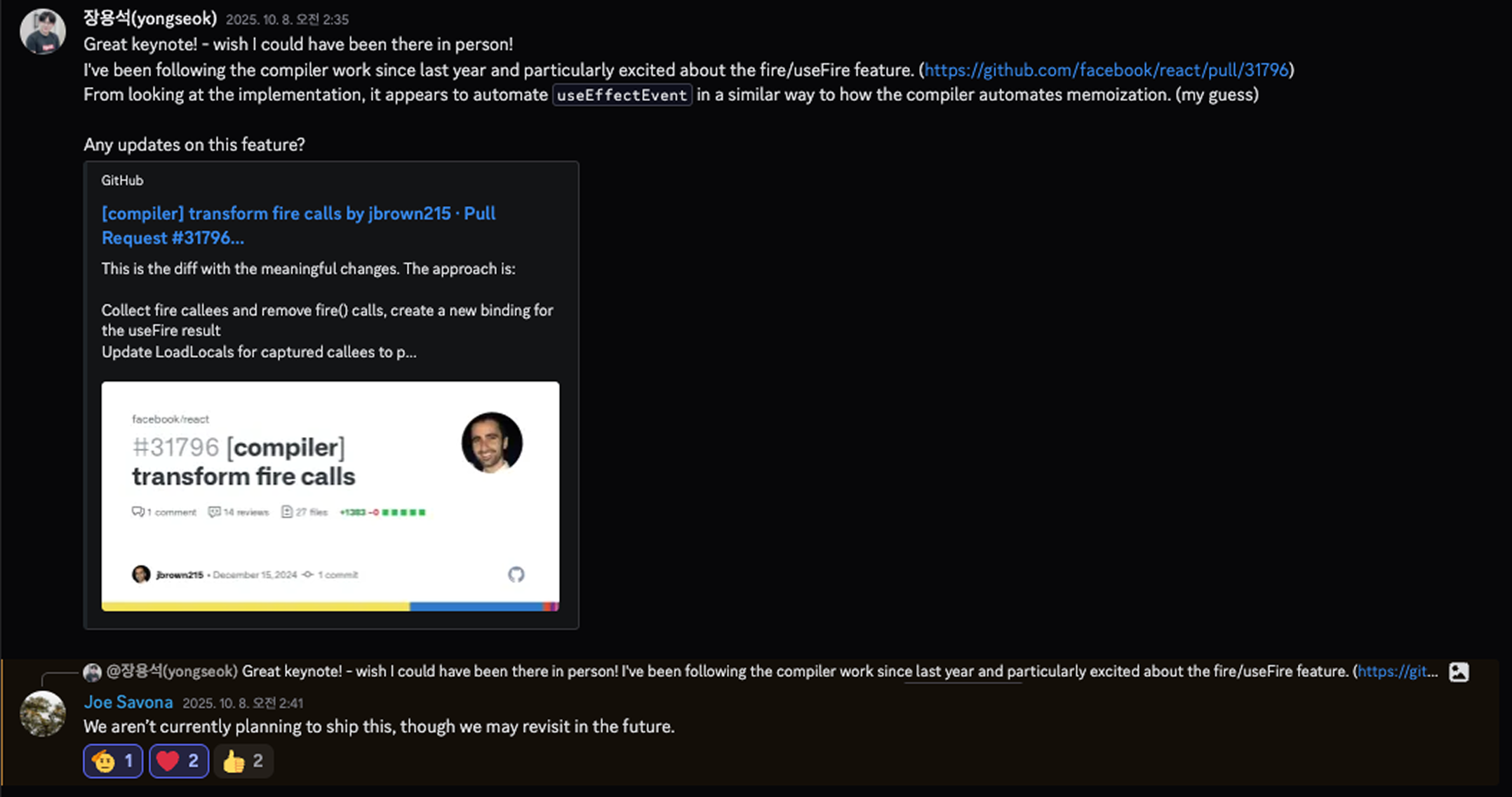
향후 계획에 대해서 React Team에 물어봤을땐 아직 계획은 없는듯 하다
fire()란?
fire()는 useEffect 안에서 “이 함수 호출은 Effect 재실행 원인이 아니다” 라고 선언하는 방법이다. useEffectEvent가 함수 정의 시점에 감싸는 방식이라면, fire()는 사용 시점에 표시하는 방식이다.
// @enableFire
import { fire } from "react";

function ChatRoom({ roomId, theme }) {
  const showMessage = () => {
    showToast(theme, `Connected to ${roomId}`);
  };

  useEffect(() => {
    const connection = createConnection(roomId);
    connection.on("connected", () => {
      fire(showMessage()); // "이 호출은 비반응적"이라고 선언
    });
    connection.connect();
    return () => connection.disconnect();
  }, [roomId, showMessage]); // showMessage가 의존성에 있어도 OK
}
핵심은 개발자는 fire()로 의도만 표시하고, 컴파일러가 나머지를 자동 처리한다는 것이다.
useEffectEvent vs fire() 비교
useEffectEvent 방식 (수동)
function ChatRoom({ roomId, theme }) {
  // 1. 수동으로 useEffectEvent로 감싸기
  const onConnected = useEffectEvent(() => {
    showToast(theme, "Connected");
  });

  useEffect(() => {
    const connection = createConnection(roomId);
    connection.on("connected", () => onConnected()); // 2. 호출
    connection.connect();
    return () => connection.disconnect();
  }, [roomId]); // 3. 수동으로 의존성 관리
}
fire() 방식 (자동)
// @enableFire
import { fire } from "react";

function ChatRoom({ roomId, theme }) {
  // 1. 그냥 일반 함수
  const onConnected = () => {
    showToast(theme, "Connected");
  };

  useEffect(() => {
    const connection = createConnection(roomId);
    connection.on("connected", () => {
      fire(onConnected()); // 2. fire()로 표시만
    });
    connection.connect();
    return () => connection.disconnect();
  }, [roomId, onConnected]); // 3. 의존성에 포함해도 OK
}
fire()의 동작 원리
React Compiler는 fire()를 useFire()로 자동 변환한다. 이때 useFire를 useEffectEvent가 된다고 생각하면 느낌이 오지 않던가?
개발자가 작성한 코드:
// @enableFire
import { fire } from "react";

function Component({ props }) {
  const foo = (p) => console.log(p);

  useEffect(() => {
    fire(foo(props));
  }, [foo, props]);
}
컴파일러가 변환한 코드:
import { useFire } from "react/compiler-runtime";

function Component({ props }) {
  const foo = _temp;

  // 1. Compiler가 자동으로 useFire 추가
  const t0 = useFire(foo);

  let t1;
  if ($[0] !== props || $[1] !== t0) {
    t1 = () => {
      t0(props); // 2. fire() 제거, useFire 결과 호출
    };
    $[0] = props;
    $[1] = t0;
    $[2] = t1;
  } else {
    t1 = $[2];
  }

  useEffect(t1, [props]); // 3. 의존성 배열 자동 수정 (foo 제거!)
}

function _temp(p) {
  console.log(p);
}
컴파일러가 하는 일:
fire(foo())→useFire(foo)호출 삽입fire()제거하고useFire결과로 대체- 의존성 배열에서 fire 함수 자동 제거
의존성 배열 자동 관리
fire()의 핵심 장점은 의존성 배열을 자동으로 정리해준다는 것이다. 컴파일러를 등에 업고 있으니 가능한 것이라 볼 수 있겠다.
개발자 작성:  [foo, props]
                  ↓
컴파일러 처리: [props]  ← foo 자동 제거!
이 설계에 대해 PR #32532에서 React 팀은 다음과 같이 설명한다:
“We landed on not including fire functions in dep arrays. They aren’t needed because all values returned from the useFire hook call will read from the same ref.”
“우리는 fire 함수를 의존성 배열에 포함하지 않기로 결정했습니다. useFire 훅 호출에서 반환된 모든 값은 동일한 ref를 읽기 때문에 필요하지 않습니다.”
useFire()가 반환하는 함수는 항상 동일한 ref를 참조한다. 함수 내부에서 읽는 값은 변할 수 있지만, 함수의 identity 자체는 변하지 않는다. 따라서 의존성 배열에 포함할 필요가 없고, 컴파일러가 이를 알고 자동으로 제외해준다.
useEffectEvent와의 차이:
// useEffectEvent - 실수로 의존성에 추가하면 ESLint 경고
useEffect(() => {
  onConnected();
}, [roomId, onConnected]); // ⚠️ ESLint 경고

// fire() - 추가해도 컴파일러가 알아서 제거
useEffect(() => {
  fire(onConnected());
}, [roomId, onConnected]); // ✅ 컴파일 후 [roomId]만 남음
fire()의 제약사항
fire()도 규칙을 따라야 한다: 규칙 또한 비슷한 부분이 있다.
// ✅ 허용: useEffect 안에서 함수 호출
useEffect(() => {
  fire(foo());
  fire(bar(a, b, c));
});

// ❌ 금지: useEffect 밖에서 사용
function Component() {
  fire(foo()); // Error!
}

// ❌ 금지: 메서드 호출
fire(obj.method()); // Error!

// ❌ 금지: 함수 호출이 아닌 표현식
fire(foo); // Error!
fire(foo() + bar()); // Error!
현재 구현 상태
fire()는 아직 실험적 기능이다.
React Compiler의 TransformFire 패스는 완성되어 있지만, 실제 useFire() 런타임 구현은 아직 React 코드베이스에 없다.
Compiler가 memo하는 과정과는 다르게 기존 useEffect상에서 비반응성에 대해서만 fire로 감싸주면 된다는 점이 살짝 리소스가 더 들긴한다.
반대로 함수를 외부로 꺼내야하는 useEffectEvent 방식보다는 응집성을 보존 할 수 있는 장점도 있기도 하다.
애초에 이런 복잡함은 Effect 라는 큰 흐름 자체가 만들어낸 업보이지 않을까 싶다.
fire() 관련 PR 히스토리
fire() 기능이 어떻게 발전해왔는지 PR을 통해 확인할 수 있다:
| PR | 날짜 | 내용 |
|---|---|---|
| #31796 | 2024-12 | 초기 구현 (TransformFire.ts) |
| #31797 | 2024-12 | useFire import 추가 |
| #31798 | 2024-12 | Effect 외부 사용 시 에러 처리 |
| #31811 | 2024-12 | 의존성 배열 자동 재작성 |
| #32532 | 2025-04 | fire 함수 의존성 제외 정책 |
실험해보고 싶다면:
// babel.config.js
{
  plugins: [
    [
      "babel-plugin-react-compiler",
      {
        enableFire: true,
      },
    ],
  ];
}
마무리
핵심 원리를 다시 정리하면:
- 문제: Effect가 재실행되지 않으면 클로저가 옛날 값을 캡처한 채로 남아있다
- 원인: JavaScript 클로저 + React의 Effect 재사용 메커니즘
- 해결:
{ impl: callback }객체 래퍼로 간접 참조, 커밋 단계에서impl업데이트
useEffectEvent는 개발자로 하여금 useEffect의 규칙을 어기게 만들던 복잡한 케이스들에 숨통을 조금 열어주었다.
하지만 동작방식을 보았을때는 조금 편법(?) 같기도 싶다. 적절하게 가미되는 조미료로는 매우 필요한 기능이나, 불필요한 경우에도 남용하게 되면 예측가능성이 흐려질 것이다.
오히려 흐름의 갈래를 더 갈라 놓게 되는게 아닐까 고민이 들기도 하다 그런의미에서 흑마법이 아닐까 생각을 정리해본다
미래에 Compiler 가 완전히 해결 해줄 것인가? React의 큰 기조를 보았을때는 그런 방향으로 갈듯하다.