A Sweltering Day and a Junior Developer’s Dilemma
A sweltering day in Shape Land.
Semo, a developer in Shape Land, is a coding prodigy who shouted ‘hello world’ before ‘mom and dad’ at age four.
Semo grew up to become a core developer in Shape Land, renowned for writing code as effortlessly as doing mental arithmetic.
Semo’s sole job is to develop logic for calculating the area of Shape Land’s citizens, working under the ‘Shape Welfare Department.’
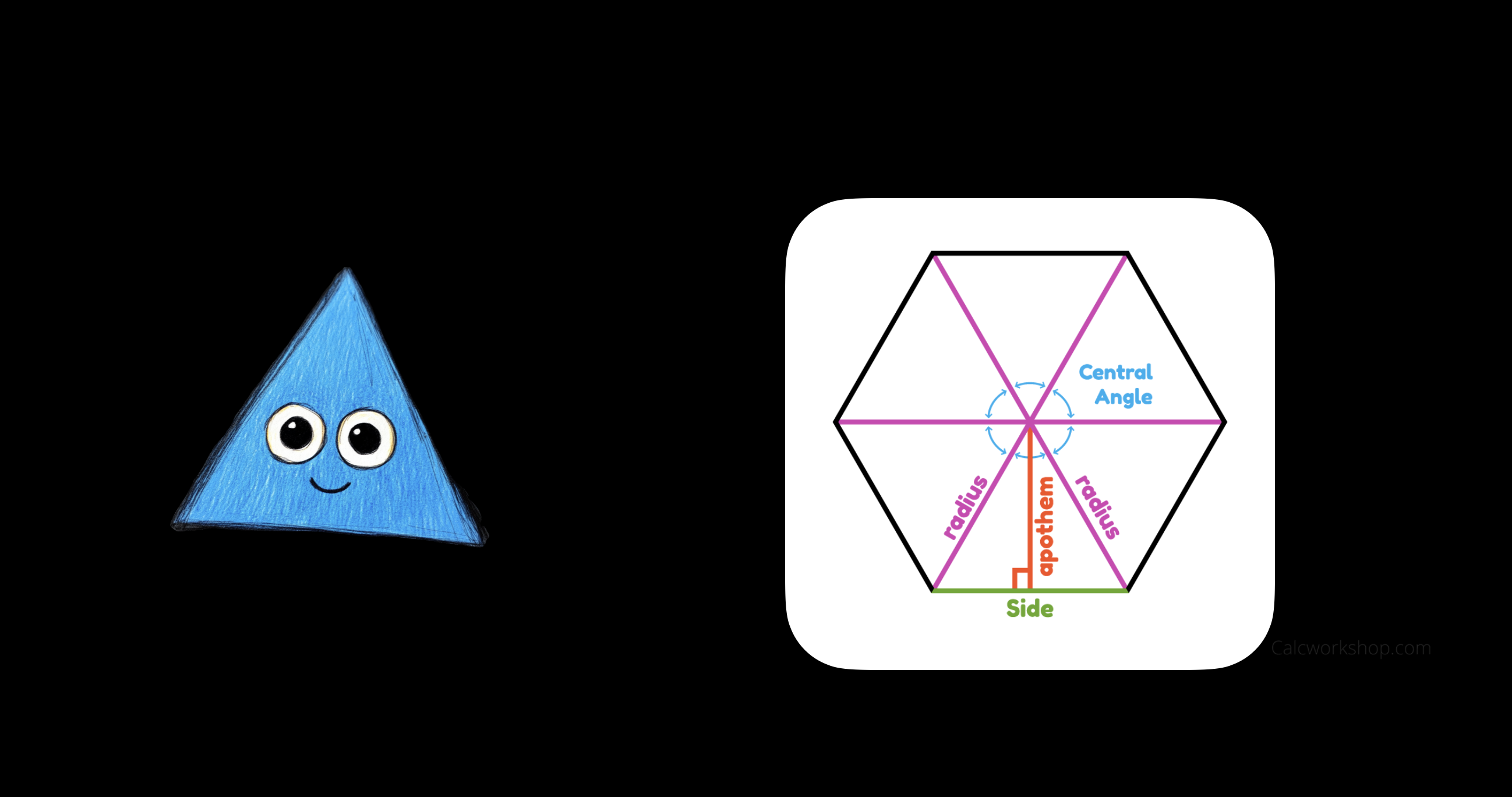
The meticulous Semo had been without a junior for a while, but a newcomer named ‘Nemo’ finally joined.
Nemo’s assignment was to understand Semo’s logic and extend it.
Nemo was astonished when they saw Semo’s code.
class RegularPolygon {
  constructor(private numberOfSides: number, private sideLength: number) {
    if (numberOfSides < 3) {
      throw new Error("Citizens of Shape Land must have at least 3 sides.");
    }
  }

  calculateArea(): number {
    const centralAngle = this.getCentralAngle();
    const triangleHeight = this.calculateTriangleHeight(centralAngle);
    const triangleArea = this.calculateTriangleArea(triangleHeight);
    const polygonArea = this.calculatePolygonArea(triangleArea);
    return polygonArea;
  }

  private getCentralAngle(): number {
    return (2 * Math.PI) / this.numberOfSides;
  }

  private calculateTriangleHeight(centralAngle: number): number {
    const halfSideLength = this.sideLength / 2;
    return halfSideLength / Math.tan(centralAngle / 2);
  }

  private calculateTriangleArea(height: number): number {
    return (this.sideLength * height) / 2;
  }

  private calculatePolygonArea(triangleArea: number): number {
    return this.numberOfSides * triangleArea;
  }
}

// Usage:
const pentagon = new RegularPolygon(5, 10);
console.log("Area:", pentagon.calculateArea());
It seemed like the logic calculated the area through several steps, but Nemo found it hard to grasp all at once.
So Nemo decided to add console.log statements to trace the process.
class RegularPolygon {
  constructor(private numberOfSides: number, private sideLength: number) {
    if (numberOfSides < 3) {
      throw new Error("Citizens of Shape Land must have at least 3 sides.");
    }
  }

  calculateArea(): number {
    const centralAngle = this.getCentralAngle();
    console.log("centralAngle:", centralAngle);
    const triangleHeight = this.calculateTriangleHeight(centralAngle);
    console.log("triangleHeight:", triangleHeight);
    // ...
  }
}
At that moment, Nemo felt Semo’s piercing gaze from behind. The meticulous Semo would not allow anyone to tamper with their code.
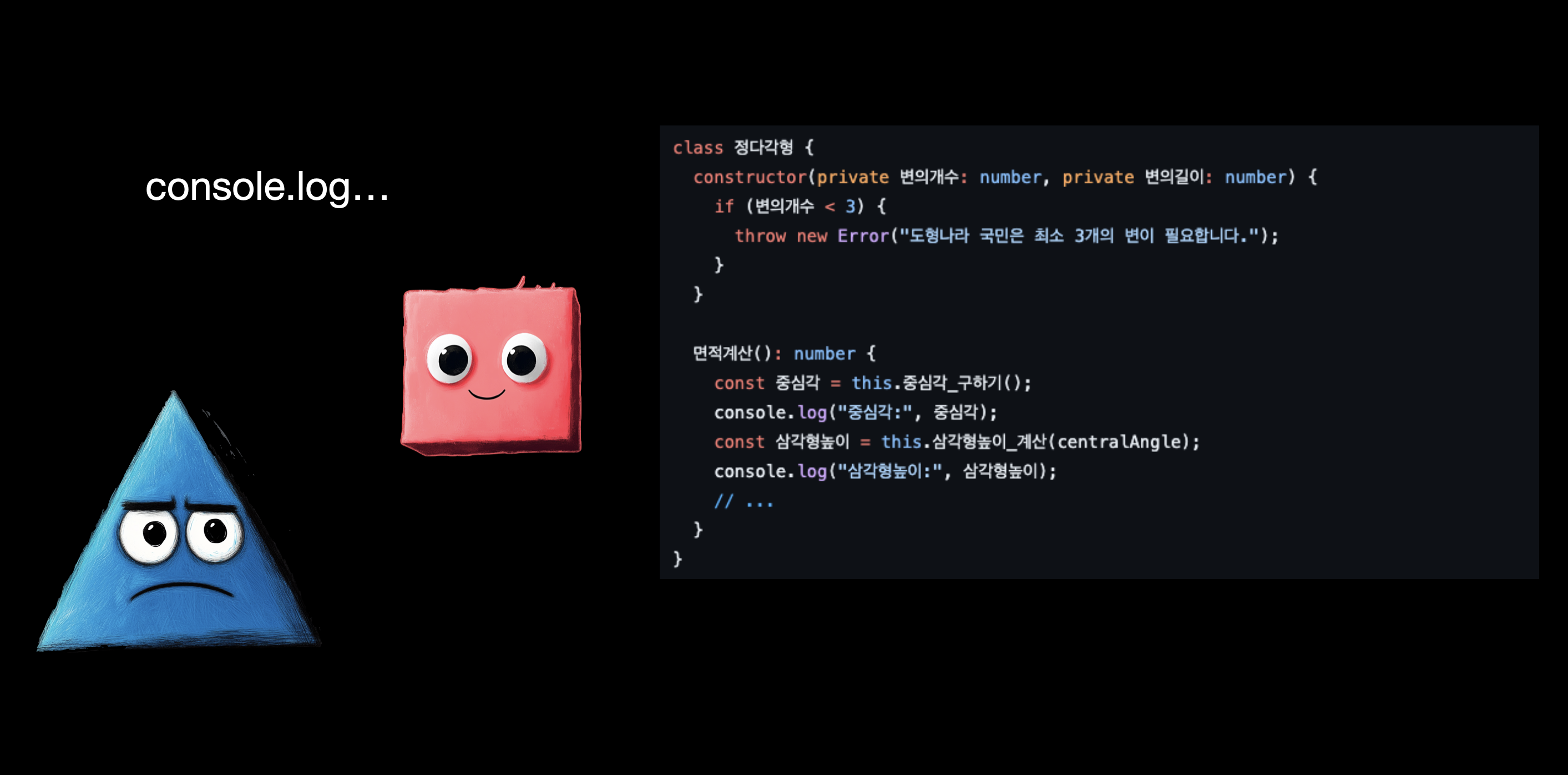
Nemo resolved to find a way to understand the process without touching Semo’s code.
Time to brainstorm. First, a previously read article came to mind.
Proxy와 Reflect 어디다 쓰나? | 장용석 블로그
Proxy와 Reflect는 ES6에서 추가된 기능이다. Proxy는 객체의 기본 동작을 가로채는 기능을 제공하고, Reflect는 객체의 기본 동작을 대신하는 메서드를 제공한다. 예시를 통해 알아보자.
https://yongseok.me/blog/proxy_reflect_case
By using a wrapping approach like Proxy, it seemed possible to inject logic at various points.
Was there a similar technique available for Classes?
Nemo recalled their time as a Python developer.
In Python, @ decorators could be used to wrap functions.
Without touching the function itself, you could add logic before and after a function call.
def logger(func):
  def wrapper(*args, **kwargs):
    print(f"Function {func.__name__} was called.")
    return func(*args, **kwargs)
  return wrapper

@logger
def func():
  print("hello world")

# Usage:
func()
# Output: Function func was called.
# Output: hello world
If JavaScript had decorators too, it would be possible to add logic without touching Semo’s code.
So Nemo set out to look into decorators.
Decorator
GitHub - tc39/proposal-decorators: Decorators for ES6 classes
Decorators for ES6 classes. Contribute to tc39/proposal-decorators development by creating an account on GitHub.
https://github.com/tc39/proposal-decoratorsDecorators are not yet part of the ECMAScript standard, but have progressed to stage 3. Since TypeScript (5.0 and above) already supports decorators, Nemo decided to give TypeScript a try.
Documentation - Decorators
TypeScript Decorators overview
https://www.typescriptlang.org/ko/docs/handbook/decorators.htmlAdding Logic Without Touching Semo’s Code Using Decorators
Before diving deeper into the documentation, Nemo decided to build something simple first.
function log(value: any, context: ClassMethodDecoratorContext) {
  const methodName = String(context.name);

  return function(this: any, ...args: any[]) {
    console.group(`[${methodName}]`);
    console.log('==> Input:', args);
    const result = value.call(this, ...args);
    console.log("<== Output:", result);
    console.groupEnd();
    return result;
  };
}
A simple log decorator was created.
This method decorator uses console.group to log information before and after each method call.
Now let’s apply the decorator to Semo’s code.
class RegularPolygon {
  constructor(private numberOfSides: number, private sideLength: number) {
    if (numberOfSides < 3) {
      throw new Error("Citizens of Shape Land must have at least 3 sides.");
    }
  }

  @log // <= Decorator applied
  calculateArea(): number {
    const centralAngle = this.getCentralAngle();
    const triangleHeight = this.calculateTriangleHeight(centralAngle);
    const triangleArea = this.calculateTriangleArea(triangleHeight);
    const polygonArea = this.calculatePolygonArea(triangleArea);
    return polygonArea;
  }

  @log
  getCentralAngle(): number {
    return (2 * Math.PI) / this.numberOfSides;
  }

  @log
  private calculateTriangleHeight(centralAngle: number): number {
    const halfSideLength = this.sideLength / 2;
    return halfSideLength / Math.tan(centralAngle / 2);
  }

  @log
  private calculateTriangleArea(height: number): number {
    return (this.sideLength * height) / 2;
  }

  @log
  private calculatePolygonArea(triangleArea: number): number {
    return this.numberOfSides * triangleArea;
  }
}

// Usage:
const pentagon = new RegularPolygon(5, 10);
console.log("Area:", pentagon.calculateArea());
The @log decorator was applied to every method.
Then Nemo ran the code.
|[calculateArea]
|==> Input: []
  |[getCentralAngle]
  |==> Input: []
  |<== Output: 1.25

  |[calculateTriangleHeight]
  |==> Input: [1.25]
  |<== Output: 6.88

  |[calculateTriangleArea]
  |==> Input: [6.88]
  |<== Output: 34.40

  |[calculatePolygonArea]
  |==> Input: [34.40]
  |<== Output: 172.00
|<== Output: 172
Area: 172.00
Success! Without modifying the logic at all, Nemo was able to get the logging they wanted.
Sure, it could have been solved simply by adding console.log inside each method, but Semo had objected.
So after taking the long way around, the problem was solved using Decorator.

Even without Semo’s objections, Nemo themselves felt uneasy about adding logs directly into the code.
What was the reason? Nemo pondered this for a while.
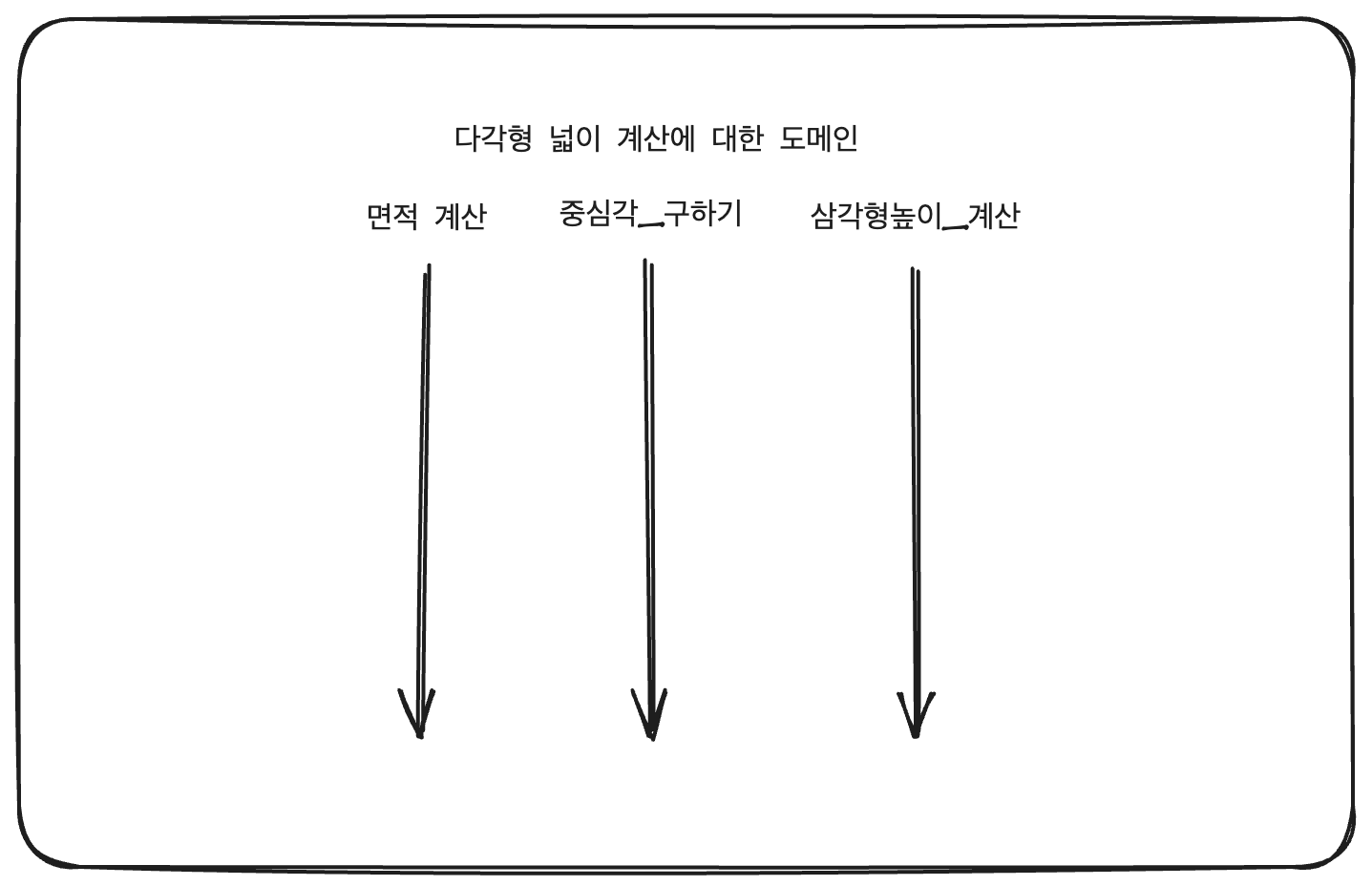
The original logic had a domain focused on calculating the area of a polygon.
Each internal method had its own role, and together they computed the polygon’s area.
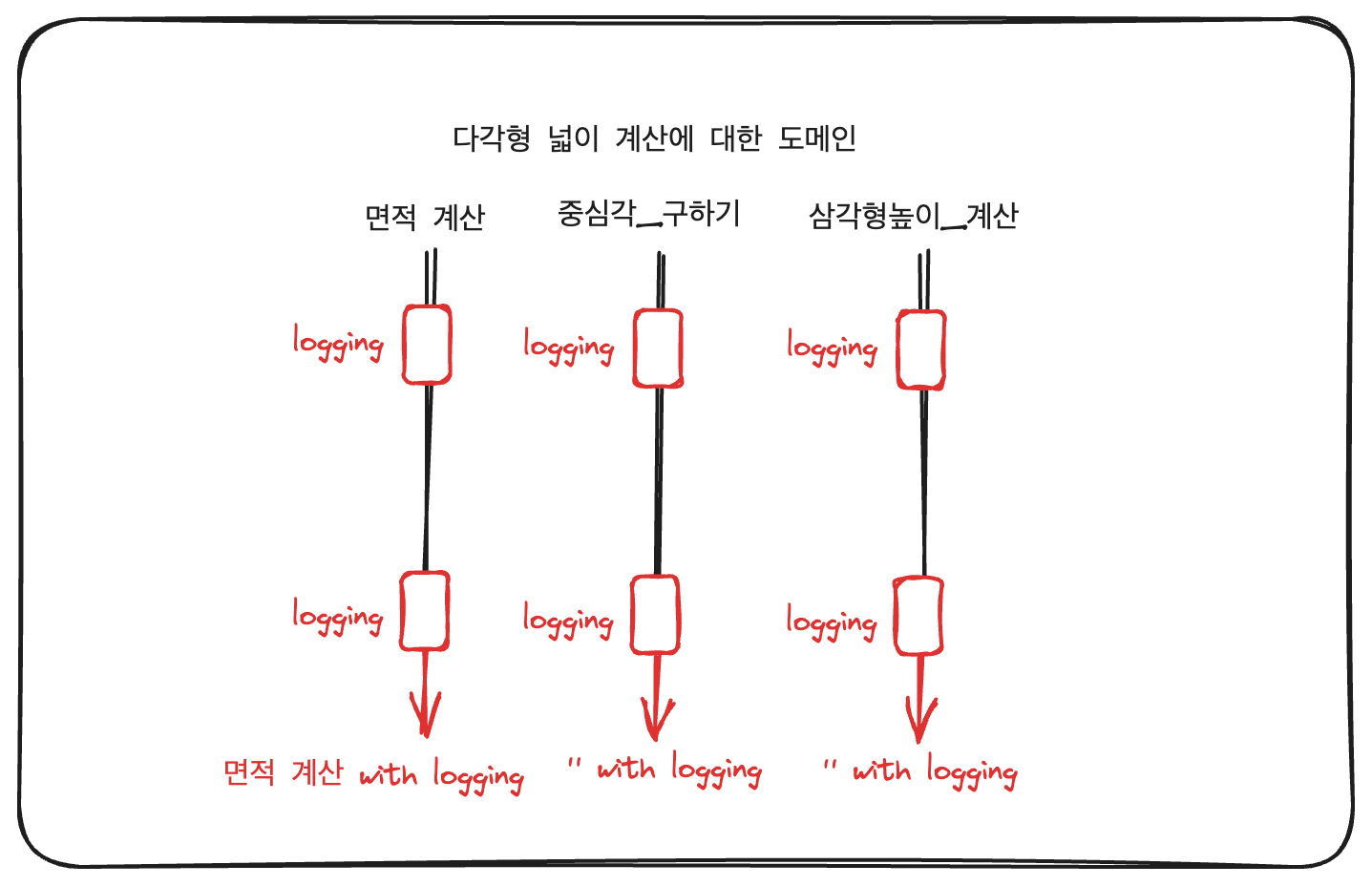
However, adding logs inside the methods mixes the original domain logic with logging.
When logic serving different purposes gets combined, calculateArea effectively becomes calculateAreaWithLogging — an entirely new method.
The reason this feels off is that logging logic is a cross-cutting concern — separate from the polygon area calculation.
It’s logic that needs to be applied regardless of the vertically running domain logic.
In this case, the target was a Class, and the implementation used a Decorator.
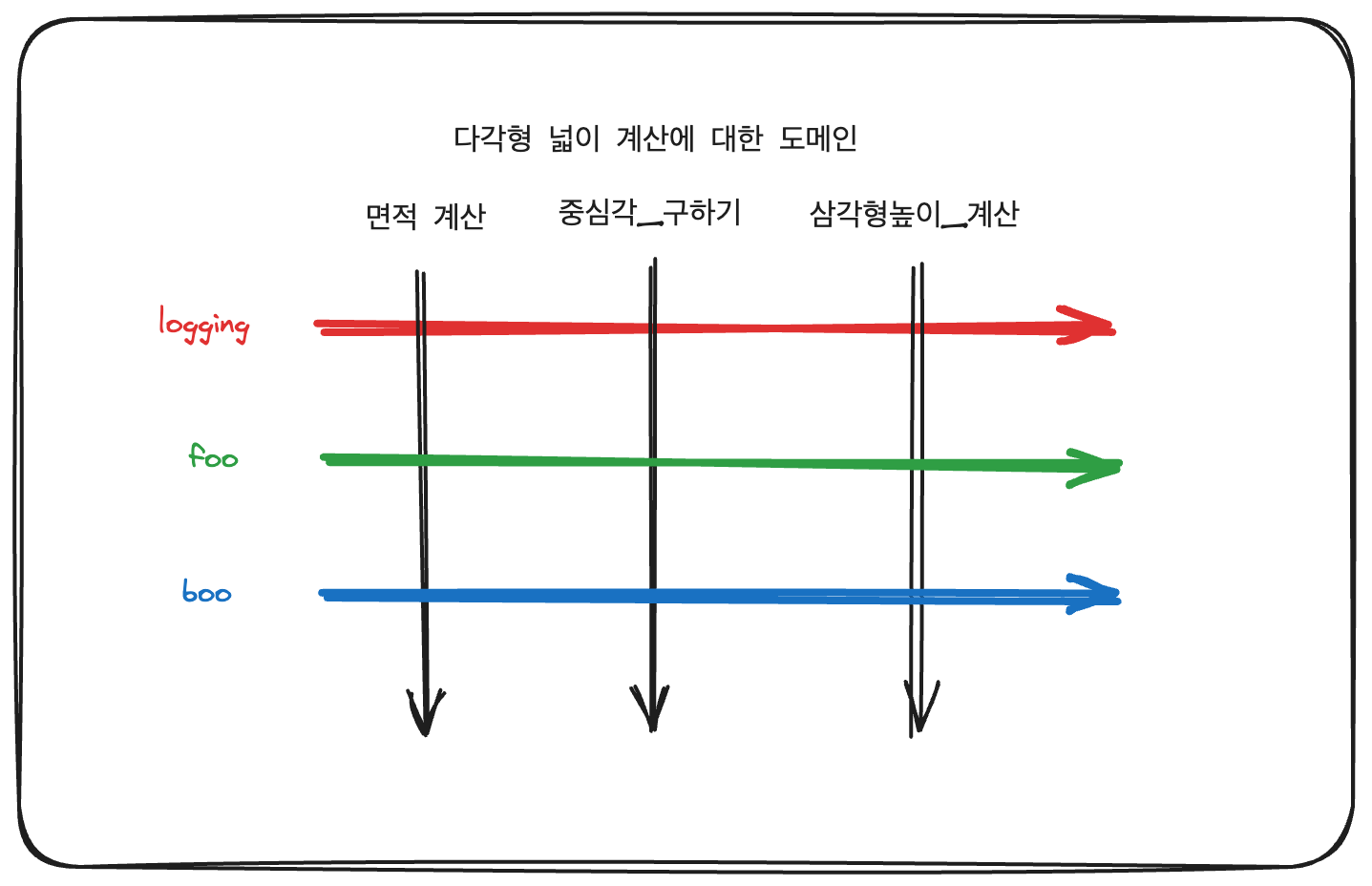
Logging was woven in horizontally without disturbing the vertical lines. Other concerns can be woven in the same way.
This process can be thought of as a kind of weaving.

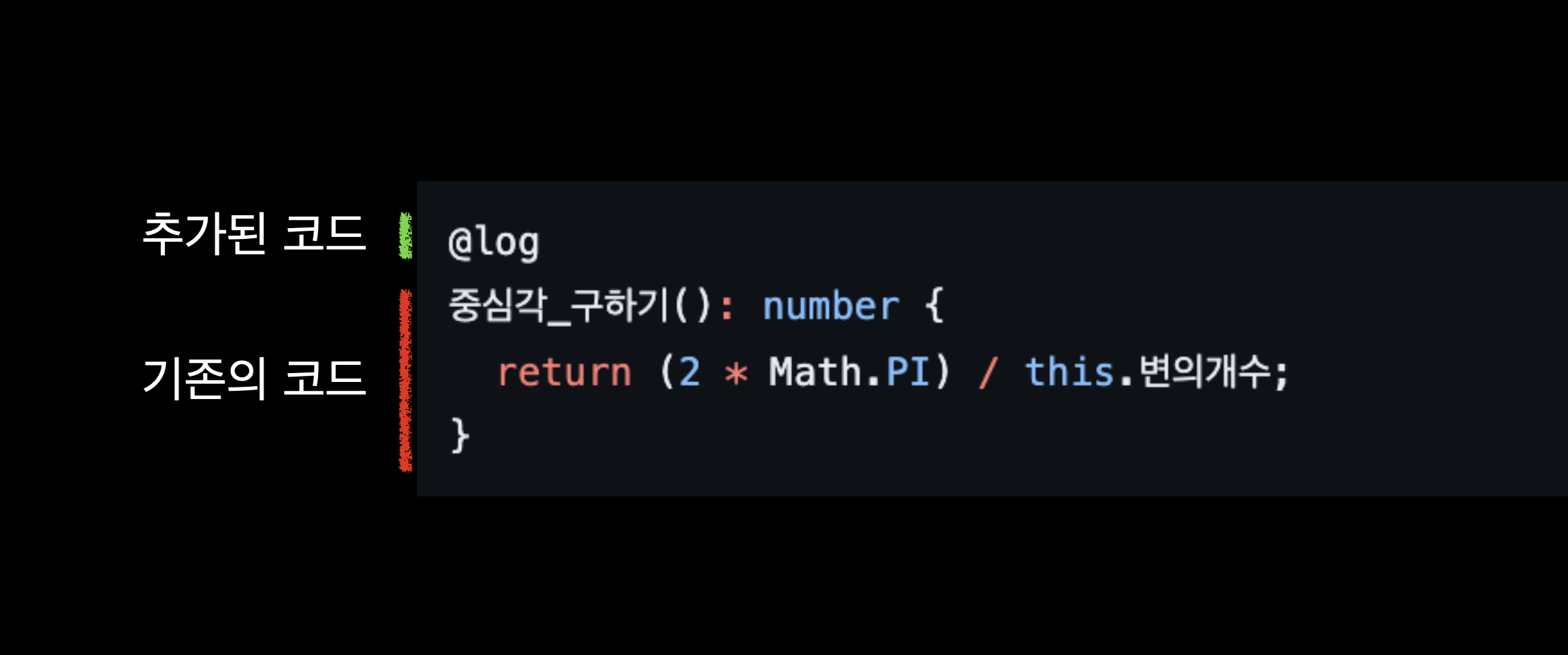
Structurally, since it doesn’t intrude on the existing logic, the cognitive burden is also reduced.
This approach is one implementation of AOP (Aspect-Oriented Programming).
Aspect-Oriented Programming
Aspect-Oriented Programming
Gregor Kiczales, John Lamping, Anurag Mendhekar, Chris Maeda, Cristina Videira Lopes, Jean-Marc Loingtier, John Irwin
https://www.cs.ubc.ca/~gregor/papers/kiczales-ECOOP1997-AOP.pdfIf you search for AOP, most results will show examples using frameworks like Spring.
This might make aspect-oriented programming seem limited to OOP, but as stated in the original paper, it can be viewed as an independent concept.
The core idea of an Aspect is separating ‘what’ to do from ‘where’ to apply it.
It’s a form of separation of concerns that reduces coupling and increases reusability.
You might also be reminded of Dependency Injection, which serves a similar purpose.
DI primarily focuses on relationships and creation between objects, whereas AOP focuses on the behavior of objects.
Rather than reducing coupling between object relationships, it reduces coupling by separating ancillary concerns from the core action of behavior.
There’s no real room for confusion, but since these concepts often come to mind together, it’s worth keeping the distinction in mind.
What Is a Decorator?
The word ‘Decorate’ means ‘to adorn’.
‘Adorning’ implies embellishing something that already exists.
In that sense, ‘decorating’ in programming also means embellishing existing things.
Think of it as adding or modifying functionality without altering the original code.
The Decorator Pattern
The concept likely originates from design patterns.
In the famous 1994 book ‘Design Patterns: Elements of Reusable Object-Oriented Software’, the Decorator Pattern was introduced as part of the Structural Patterns.
Structural Patterns are concerned with how classes and objects are composed to form larger structures.
Among them, the Decorator Pattern is described as a pattern that dynamically attaches additional responsibilities to an object.
You might think of inheritance as a way to add responsibilities.
Let’s use an example.
Imagine you ordered a coffee at Starbucks.
Normally you order a regular coffee, but today you want to add syrup.
class Americano:
  def description(self):
    return "Americano"

my_coffee = Americano()
my_coffee.description() # Americano
You could create a SyrupAmericano class that inherits from Americano to order an americano with syrup.
class SyrupAmericano(Americano):
  def description(self):
    return "Americano with one pump of syrup"


my_coffee = SyrupAmericano()
my_coffee.description() # Americano with one pump of syrup
But we can’t add SyrupAmericano to the menu board.
We simply want to add syrup to the Americano instance we already have.
Inheritance is static. It’s determined at compile time and cannot be changed at runtime.
This is where the Decorator Pattern comes in.
class Americano:
  def description(self):
    return "Americano"

class CoffeeDecorator:
  def __init__(self, coffee):
    self.coffee = coffee

  def description(self):
    return self.coffee.description()

class SyrupDecorator(CoffeeDecorator):
  def description(self):
    return self.coffee.description() + " with syrup"

class WhippedCreamDecorator(CoffeeDecorator):
  def description(self):
    return self.coffee.description() + " with whipped cream"

my_coffee = Americano()
my_coffee = SyrupDecorator(my_coffee) # Dynamically add syrup

print(my_coffee.description()) # Americano with syrup

friends_coffee = WhippedCreamDecorator(SyrupDecorator(Americano()))
It maintains the same interface as the original coffee while dynamically adding responsibilities.
The wording might sound a bit complex. The book additionally explains: “A decorator is a structural pattern that allows open-ended additional responsibilities by recursively composing objects.”
You could also think of it as a kind of Wrapper.
Decorators vs. the Decorator Pattern
Decorators and the Decorator Pattern — one is a language-level syntax feature and the other is a design pattern, so they aren’t directly equivalent concepts.
What is the difference between Python decorators and the decorator pattern?
What is the difference between “Python decorators” and the “decorator pattern”?

When should I use Python decorators, and when should I use the decorator pattern?

I'm looking for examples of Python
https://stackoverflow.com/questions/8328824/what-is-the-difference-between-python-decorators-and-the-decorator-pattern
Considering the problem that the Decorator Pattern as described in the book aims to overcome, it can be seen as a pattern that solves issues primarily found in statically typed languages by addressing them at a dynamic level.
Let’s look at decorator-like features in other languages.
Python
Let’s first look at Python’s decorators.
Among all the discussions about decorators, my favorite is what’s written in PEP 318. Let’s read through some of it together.
PEP 318 – Decorators for Functions and Methods | peps.python.org
The current method for transforming functions and methods (for instance, declaring them as a class or static method) is awkward and can lead to code that is difficult to understand. Ideally, these transformations should be made at the same point in the...
https://peps.python.org/pep-0318/
While this is a proposal for new language-level syntax, I liked that it contains conceptual insights that are also helpful at the implementation level when writing code.
Try reading it again, but replacing the keyword ‘syntax’ with ‘code’ or ‘implementation.’
Good design is a concept that transcends domains and cuts across boundaries, I believe.
We’ve gone on a bit of a tangent, but referencing what’s mentioned in the PEP, decorators are tools for transforming functions and methods, and their purpose is to place these transformations close to the declaration to improve code readability.
They allow code to be expressed more declaratively for the reader, increasing cohesion and reducing coupling.
So then, what purpose do our JavaScript decorators serve?
JavaScript
GitHub - tc39/proposal-decorators: Decorators for ES6 classes
Decorators for ES6 classes. Contribute to tc39/proposal-decorators development by creating an account on GitHub.
https://github.com/tc39/proposal-decorators?tab=readme-ov-fileAs the TC39 Proposal shows, applying the decorator pattern to functions in JavaScript was straightforward — you could simply wrap them. As shown in the example from the spec document:
const foo = bar(baz(qux(() => /* do something cool */)))However, applying this to classes or objects was difficult. The Decorator syntax was proposed to solve this problem.
So what does a Decorator fundamentally mean in JavaScript?
Let’s start by looking at a simple method decorator.
function logged(value, { kind, name }) {
  if (kind === "method") {
    return function (...args) {
      console.log(`starting ${name} with arguments ${args.join(", ")}`);
      const ret = value.call(this, ...args);
      console.log(`ending ${name}`);
      return ret;
    };
  }
}

class C {
  @logged
  m(arg) {}
}

new C().m(1);
// starting m with arguments 1
// ending m
First, let’s break down the target — the Class itself. In JavaScript (ES6), a method can also be expressed like this:
function C() {}

C.prototype.m = function(arg) {};

new C().m(1);
Then, just as we implemented the decorator pattern for functions above, we can apply the decorator pattern to methods as well. If we desugar the decorator, it can be roughly expressed as follows:
class C {
  m(arg) {}
}

C.prototype.m = logged(C.prototype.m, {
  kind: "method",
  name: "m",
  static: false,
  private: false,
}) ?? C.prototype.m;
Current Status
The TC39 Process
No description available
https://tc39.es/process-document/JavaScript decorators are currently at Stage 3. Stage 3 is essentially close to the final specification. However, since they haven’t been officially incorporated into the language yet, you need to rely on transpilers like Babel or TypeScript to use them.
For Babel, the following plugin is available: https://babeljs.io/docs/babel-plugin-proposal-decorators
What about TypeScript?
TypeScript has supported decorators for quite a long time. You may have heard of the somewhat familiar tsconfig option
"experimentalDecorators": true, which enabled the use of decorators.
differences-with-experimental-legacy-decorators
Today we’re excited to announce the release of TypeScript 5.0! This release brings many new features, while aiming to make TypeScript smaller, simpler, and faster. We’ve implemented the new decorators standard, added functionality to better support ESM projects in Node and bundlers, provided new ways for library authors to control generic inference, expanded our JSDoc […]
https://devblogs.microsoft.com/typescript/announcing-typescript-5-0/#differences-with-experimental-legacy-decorators
This option enabled the use of Stage 2 decorators.
Since TypeScript 5.0, Stage 3 decorators have become available, and the experimentalDecorators option has been relegated to legacy use.
Announcing TypeScript 5.0 - TypeScript
Today we’re excited to announce the release of TypeScript 5.0! This release brings many new features, while aiming to make TypeScript smaller, simpler, and faster. We’ve implemented the new decorators standard, added functionality to better support ESM projects in Node and bundlers, provided new ways for library authors to control generic inference, expanded our JSDoc […]
https://devblogs.microsoft.com/typescript/announcing-typescript-5-0/#decorators Once decorators are officially part of the language, when targeting the latest engines, it will be possible to run them natively without transpilation. Work on the V8 side also appears to be in progress:
Implement the decorators proposal
The decorators proposal (https://github.com/tc39/proposal-decorators) reached Stage 3 at the March 2022 TC39.
https://issues.chromium.org/issues/42202709https://chromium-review.googlesource.com/q/hashtag:%22decorators%22
Gerrit Code Review
https://chromium-review.googlesource.com/q/hashtag:%22decorators%22Metadata
A decorator does its best to take full responsibility for the target it decorates. However, to make better use of decorators, there are times when additional information about the target class or method is needed. For example, metadata can be useful when you want to decorate a class while checking for the presence of other decorators, or when you want to leverage information about the class as a whole.
In the current Stage 3 JavaScript decorators, access to information about the decorated target is limited. A decorator basically receives a context object that contains information about the method, field, or class it decorates. This context only provides information about the specific target being decorated — it cannot access the class itself or information about other fields.
Stage 2 vs Stage 3 Metadata Access
In the former Stage 2 decorators, it was possible to access the entire class prototype through the target parameter.
This allowed decorators to store metadata at the class level and build upon it.
For instance, when decorating a specific class, you could use a WeakMap keyed by the class itself to store and reference related metadata.
const metadataMap = new WeakMap();

function myDecorator(target, key, descriptor) {
  // Can access the class prototype
  const metadata = metadataMap.get(target) || {};
  metadata[key] = { someMetadata: 'value' };
  metadataMap.set(target, metadata);

  return descriptor;
}

class MyClass {
  @myDecorator
  myMethod() {}
}
In the example above, target was used to access the class’s prototype,
and metadata about the class could be stored in metadataMap for later reuse.
In Stage 3, this changed to the following:
function someDecorator(originalMethod:any, context: ClassMethodDecoratorContext){
  const methodName = String(context.name);
  // ...
}
The target was removed, and decorators now only have information about the specific element they decorate.
The reasoning behind this can be found in the proposal.
If decorators could make changes to the class itself, it would make the class’s behavior harder to predict. To avoid this, decorators were limited to only having information about the specific target they decorate.
So what should you do when a decorator needs information about the class as a whole?
Just understanding the concept isn’t enough. Let’s look at an actual use case. When might a decorator need to know about other things?
Dependency Injection and Metadata
Metadata also plays a crucial role in implementing the Dependency Injection (DI) pattern. Dependency Injection is a pattern where, instead of a class creating its own dependencies internally, they are injected from the outside. Let’s look at a case where decorators are used to implement Dependency Injection in the JavaScript ecosystem.
The first thing that comes to mind is NestJS’s Dependency Injection.
Documentation | NestJS - A progressive Node.js framework
Nest is a framework for building efficient, scalable Node.js server-side applications. It uses progressive JavaScript, is built with TypeScript and combines elements of OOP (Object Oriented Programming), FP (Functional Programming), and FRP (Functional Reactive Programming).
https://docs.nestjs.com/providers#dependency-injection
As stated in the documentation, Nest is a framework built on top of Dependency Injection. Let’s look at the starter example code that you get when first setting up NestJS.
import { Injectable } from '@nestjs/common';

@Injectable()
export class AppService {
  getHello(): string {
    return 'Hello World!';
  }
}

// app.controller.ts
import { Controller, Get } from '@nestjs/common';
import { AppService } from './app.service';

@Controller()
export class AppController {
  constructor(private readonly appService: AppService) {}

  @Get()
  getHello(): string {
    return this.appService.getHello();
  }
}


// app.module.ts
import { Module } from '@nestjs/common';
import { AppController } from './app.controller';
import { AppService } from './app.service';

@Module({
  imports: [],
  controllers: [AppController],
  providers: [AppService],
})
export class AppModule {}
Let’s examine the structure.
Looking at this code alone, we can see that AppController uses AppService,
but we can’t tell how AppService is actually injected.
The only clues we can identify are that AppService — the injection target — uses the @Injectable() decorator,
and that AppModule registers AppService under providers.
Do the @Injectable(), @Controller, or @Module decorators perform some kind of magic?
export function Injectable(options?: InjectableOptions): ClassDecorator {
  return (target: object) => {
    Reflect.defineMetadata(INJECTABLE_WATERMARK, true, target);
    Reflect.defineMetadata(SCOPE_OPTIONS_METADATA, options, target);
  };
}

export function Module(metadata: ModuleMetadata): ClassDecorator {
  const propsKeys = Object.keys(metadata);
  validateModuleKeys(propsKeys);

  return (target: Function) => {
    for (const property in metadata) {
      if (metadata.hasOwnProperty(property)) {
        Reflect.defineMetadata(property, (metadata as any)[property], target);
      }
    }
  };
}
When you actually look at the code, it’s only a few lines. Nothing magical is happening — they’re just setting things up.
Clearly, when NestJS runs, something somewhere creates AppService and injects it into AppController.
But the actual wiring is not visible to us from the surface. We merely registered AppService in the module.
The fact that nothing is injected directly on the surface means that someone is doing the injection based on “information” alone.
Here, we used the @Injectable decorator to mark the class as “injectable” (information), and the @Module decorator to pass along this “information.”
Through this, NestJS internally creates AppService and injects it into AppController.
The important thing here is that metadata served as the medium for this “information.”
Reflect.defineMetadata(INJECTABLE_WATERMARK, true, target);Metadata can be thought of as “information about information.”
Here, Reflect.metadata was used, which was the approach taken before Stage 3.
Just a moment...
No description available
https://www.npmjs.com/package/reflect-metadataThe metadata proposal is also progressing separately from the decorator proposal. It is currently at Stage 3, and TypeScript has supported metadata aligned with Stage 3 since version 5.2.
Documentation - TypeScript 5.2
Decorator Metadata
https://www.typescriptlang.org/docs/handbook/release-notes/typescript-5-2.html#decorator-metadataGitHub - tc39/proposal-decorator-metadata
Contribute to tc39/proposal-decorator-metadata development by creating an account on GitHub.
https://github.com/tc39/proposal-decorator-metadataStage 3 Metadata
Let’s see how things changed in Stage 3 by rebuilding the Dependency Injection example ourselves.
First, let’s create the Injectable decorator.
(Symbol as any).metadata ??= Symbol('Symbol.metadata');

const METADATA_KEY = Symbol('DI:METADATA');

function Injectable() {
  return function (_: unknown, context: ClassDecoratorContext) {
    const metadata = (context.metadata[METADATA_KEY] as any) ?? { injectable: true };
    metadata.injectable = true;
    context.metadata[METADATA_KEY] = metadata;
  };
}
The Injectable decorator adds an injectable key to the class’s metadata and sets it to true.
It marks the class as eligible for injection.
Next, let’s create the Inject decorator.
function Inject(dependencyName: string) {
  return function (_: unknown, context: ClassFieldDecoratorContext) {
    const metadata = (context.metadata[METADATA_KEY] as any) ?? { dependencies: {} };
    metadata.dependencies = metadata.dependencies ?? {};
    metadata.dependencies[context.name] = dependencyName;
    context.metadata[METADATA_KEY] = metadata;
  };
}
The Inject decorator takes a dependencyName and adds a dependencies key to the class’s metadata, storing the dependencyName under the field name as its key.
This allows us to indicate what dependencies a given class has.
Now that each marker is ready, let’s create a Container class to manage everything centrally.
class Container {
  private services: Map<string, any>;

  constructor() {
    this.services = new Map();
  }

  register(name: string, ServiceClass: any): void {
    console.log(`Registering service ${name}`);
    this.services.set(name, ServiceClass);
  }

  resolve(name: string): any {
    console.log(`Resolving service ${name}`);
    const ServiceClass = this.services.get(name);
    if (!ServiceClass) {
      throw new Error(`Service ${name} not found`);
    }

    const metadata = (ServiceClass as any)[Symbol.metadata]?.[METADATA_KEY];
    if (!metadata || !metadata.injectable) {
      throw new Error(`Service ${name} is not injectable`);
    }

    const instance = new ServiceClass();

    if (metadata.dependencies) {
      for (const [propertyKey, dependencyName] of Object.entries(metadata.dependencies)) {
        instance[propertyKey] = this.resolve(dependencyName as string);
      }
    }

    return instance;
  }
}
The Container class registers services through its register method and retrieves them through its resolve method.
During the process of resolving a service by name, it retrieves the service’s dependency information via metadata and recursively resolves all dependencies.
// ...
const instance = new ServiceClass(); // Create an instance of ServiceClass

if (metadata.dependencies) { // If there are dependencies
  for (const [propertyKey, dependencyName] of Object.entries(metadata.dependencies)) {
    instance[propertyKey] = this.resolve(dependencyName as string); // Resolve the dependency
  }
}
return instance;
Let’s create the actual usage code.
@Injectable()
class ProductService {
  constructor() {
    console.log('ProductService created');
  }

  getName() {
    return 'Product Service';
  }
}

@Injectable()
class PriceService {
  constructor() {
    console.log('PriceService created');
  }
  getPrice() {
    return 100;
  }
}

@Injectable()
class ShopService {
  @Inject('productService')
  productService!: ProductService;

  @Inject('priceService')
  priceService!: PriceService;

  listProductsWithPrices() {
    return `${this.productService.getName()} costs ${this.priceService.getPrice()}`;
  }
}

const container = new Container();

container.register('productService', ProductService);
container.register('priceService', PriceService);
container.register('shopService', ShopService);

const shopService = container.resolve('shopService');

console.log(shopService instanceof ShopService); // true
console.log(shopService.productService instanceof ProductService); // true
console.log(shopService.priceService instanceof PriceService); // true
console.log(shopService.listProductsWithPrices()); // Product Service costs 100
We created three classes, registered them all with the Container, and then resolved ShopService to use it.
Throughout this process, we never directly injected any dependencies, yet through the Container, dependencies were injected and ready to use.
By structuring things this way, ShopService depends on ProductService and PriceService, but it doesn’t depend on the specific implementation details of how they are created or injected.
In other words, we’ve reduced coupling.
We achieved this reduced coupling by using a third-party intermediary — the Container — and metadata as the medium for exchanging information. From the perspective of “information about information,” metadata played its role brilliantly.
There is no magic. I believe the law of conservation of mass-energy applies to our code as well. (Not in a literal physics sense, mind you — don’t take this too seriously.) The act of severing something to reduce coupling is much like splitting protons and neutrons held together by the strong force. In the process of nuclear fission, a neutron is fired at uranium-235 to split the nucleus. During this process, a mass defect occurs and binding energy is released, converting into usable energy. The process of firing that neutron is analogous to us investing time and resources, using various techniques (like the metadata approach above) to reduce coupling.
Reducing coupling requires a certain amount of energy (cost), but the energy released and returned to us as a result will be greater.
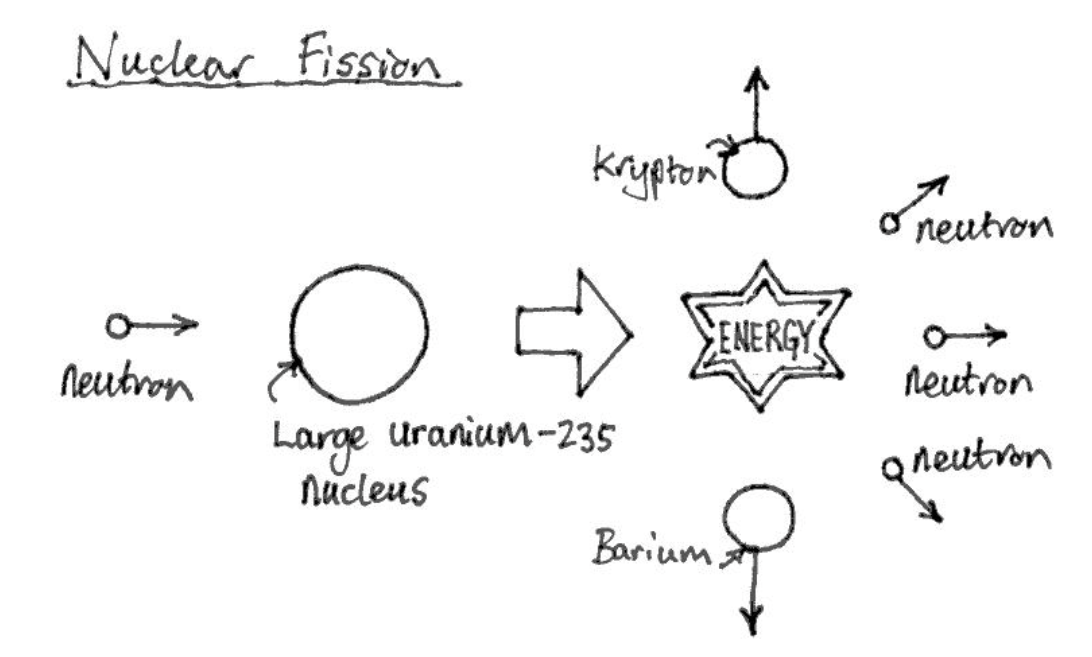
Source: https://www.automated-teaching-machines.com/Intermediate-Science/310-Nuclear-Fission-and-Fusion.php
P.S. However, too much of a good thing can be harmful. Excessive decoupling that doesn’t match the scale of the project, or decoupling where the means and ends become inverted, can backfire. Think about what uncontrolled (nuclear) fission has led to throughout history.
Reference
https://ko.javascript.info/class#ref-285 https://www.cs.ubc.ca/~gregor/papers/kiczales-ECOOP1997-AOP.pdf https://en.wikipedia.org/wiki/Aspect-oriented_programming
https://peps.python.org/pep-0318/ https://github.com/tc39/proposal-decorators?tab=readme-ov-file
https://docs.google.com/document/d/1GMp938qlmJlGkBZp6AerL-ewL1MWUDU8QzHBiNvs3MM/edit https://springframework.guru/gang-of-four-design-patterns/
https://groups.google.com/g/v8-reviews/c/inK1X-XQQPg https://chromium-review.googlesource.com/q/hashtag:%22decorators%22+(status:open%20OR%20status:merged) https://chromium-review.googlesource.com/c/v8/v8/+/5837979 https://chromium-review.googlesource.com/c/v8/v8/+/5837979/4/src/interpreter/bytecode-generator.cc#3154
https://www.typescriptlang.org/docs/handbook/release-notes/typescript-5-2.html#decorator-metadata https://www.typescriptlang.org/docs/handbook/decorators.html https://www.typescriptlang.org/tsconfig/#experimentalDecorators https://devblogs.microsoft.com/typescript/announcing-typescript-5-0/#decorators https://devblogs.microsoft.com/typescript/announcing-typescript-5-0/#differences-with-experimental-legacy-decorators
https://2ality.com/2022/10/javascript-decorators.html https://medium.com/javascript-scene/javascript-factory-functions-vs-constructor-functions-vs-classes-2f22ceddf33e