useEffectEvent is black magic. Or is it?
useEffectEvent became stable with React 19.2. Let’s look at what it is, why it was introduced, and how to use it going forward.
What is useEffectEvent?
useEffectEvent is well explained in the docs. To quote:
## Usage
Reading the latest props and state
Typically, when you access a reactive value inside an Effect, you must include it in the dependency array. This makes sure your Effect runs again whenever that value changes, which is usually the desired behavior.

But in some cases, you may want to read the most recent props or state inside an Effect without causing the Effect to re-run when those values change.

To read the latest props or state in your Effect, without making those values reactive, include them in an Effect Event.
That’s the explanation from the docs. In short, it’s a hook that wraps functions used inside useEffect so they can always access the latest values.
This might not be immediately intuitive. Let’s first walk through some problem cases using examples from the docs.
Why useEffectEvent is needed
I’ve slightly modified the examples to make them easier to understand.
Case 1. Including all dependencies
function ChatRoom({ roomId, theme }) {
  useEffect(() => {
    const connection = createConnection(serverUrl, roomId);
    connection.on("connected", () => {
      showNotification("Connected!", theme);
    });
    connection.connect();
    return () => {
      showNotification("Disconnected!", theme);
      connection.disconnect();
    };
  }, [roomId, theme]);

  return <h1>Welcome to the {roomId} room!</h1>;
}
useEffect is typically used for synchronizing with external systems. In this case, it’s a connection to a chat room.
We establish a connection via createConnection and use connection.on to show a notification when the connection is established.
We’ve also added a notification for when the connection is disconnected. The notification function takes a message and the theme as arguments.
The problem is when theme changes. When theme changes, the useEffect re-runs, disconnecting and reconnecting. This is extremely inefficient — the notification theme and the connection are completely unrelated concerns. So how can we fix this?
Try toggling the theme in the example below.
import { useState, useEffect } from "react";
import { createConnection } from "./chat.js";
import { showNotification } from "./notifications.js";

const serverUrl = "https://localhost:1234";

function ChatRoom({ roomId, theme }) {
  useEffect(() => {
    const connection = createConnection(serverUrl, roomId);
    connection.on("connected", () => {
      showNotification("Connected!", theme);
    });
    connection.connect();
    return () => {
      showNotification("Disconnected!", theme);
      connection.disconnect();
    };
  }, [roomId, theme]); // Reconnects every time theme changes!

  return <h1>Welcome to the {roomId} room!</h1>;
}

export default function App() {
  const [roomId, setRoomId] = useState("general");
  const [isDark, setIsDark] = useState(false);
  return (
    <>
      <label>
        Choose the chat room:{" "}
        <select value={roomId} onChange={(e) => setRoomId(e.target.value)}>
          <option value="general">general</option>
          <option value="travel">travel</option>
          <option value="music">music</option>
        </select>
      </label>
      <label>
        <input
          type="checkbox"
          checked={isDark}
          onChange={(e) => setIsDark(e.target.checked)}
        />
        Use dark theme
      </label>
      <hr />
      <ChatRoom roomId={roomId} theme={isDark ? "dark" : "light"} />
    </>
  );
}
(There are other issues here too, but let’s focus on the connection problem for now.)
You can see that changing the theme causes the connection to be re-established.
Case 2. Breaking the rules by removing the dependency
Would it help to remove theme from the useEffect dependency array?
The moment you do, you’ll get the ‘React Hook useEffect has a missing dependency’ eslint warning.
function ChatRoom({ roomId, theme }) {
  useEffect(() => {
    const connection = createConnection(serverUrl, roomId);
    connection.on("connected", () => {
      showNotification("Connected!", theme);
    });
    connection.connect();
    return () => {
      showNotification("Disconnected!", theme);
      connection.disconnect();
    };
    // eslint-disable-next-line
  }, [roomId]);

  return <h1>Welcome to the {roomId} room!</h1>;
}
It’s a workaround, but this way changing theme won’t trigger a new connection. To do this, though, we had to break React’s rules first.
So does this actually solve the problem? Let’s run it and see.
import { useState, useEffect } from "react";
import { createConnection } from "./chat.js";
import { showNotification } from "./notifications.js";

const serverUrl = "https://localhost:1234";

function ChatRoom({ roomId, theme }) {
  useEffect(() => {
    const connection = createConnection(serverUrl, roomId);
    connection.on("connected", () => {
      showNotification("Connected!", theme);
    });
    connection.connect();
    return () => {
      showNotification("Disconnected!", theme);
      connection.disconnect();
    };
    // eslint-disable-next-line react-hooks/exhaustive-deps
  }, [roomId]); // Removing theme causes Stale Closure!

  return <h1>Welcome to the {roomId} room!</h1>;
}

export default function App() {
  const [roomId, setRoomId] = useState("general");
  const [isDark, setIsDark] = useState(false);
  return (
    <>
      <label>
        Choose the chat room:{" "}
        <select value={roomId} onChange={(e) => setRoomId(e.target.value)}>
          <option value="general">general</option>
          <option value="travel">travel</option>
          <option value="music">music</option>
        </select>
      </label>
      <label>
        <input
          type="checkbox"
          checked={isDark}
          onChange={(e) => setIsDark(e.target.checked)}
        />
        Use dark theme
      </label>
      <hr />
      <ChatRoom roomId={roomId} theme={isDark ? "dark" : "light"} />
    </>
  );
}
Try changing the theme and then switching to a different chat room.
Now changing the theme doesn’t re-establish the connection. But there’s still a problem. If you change the theme and then switch to a different chat room, the “Disconnected” notification still shows with the old theme, while the new “Connected!” notification shows with the updated theme.
Case 3. Applying useEffectEvent
So what if we use useEffectEvent instead — does that fix it?
import { useEffect, useEffectEvent } from "react";

function ChatRoom({ roomId, theme }) {
  const onConnect = useEffectEvent(() => {
    showNotification("Connected!", theme);
  }); // wrapped with useEffectEvent
  const onDisconnect = useEffectEvent(() => {
    showNotification("Disconnected!", theme);
  });

  useEffect(() => {
    const connection = createConnection(serverUrl, roomId);
    connection.on("connected", () => {
      onConnect();
    });
    connection.connect();
    return () => {
      onDisconnect();
      connection.disconnect();
    };
  }, [roomId]);

  return <h1>Welcome to the {roomId} room!</h1>;
}
We wrapped each handler with useEffectEvent. And since we reference them inside useEffect, the eslint warning is gone too.
Try changing the theme and then switching chat rooms.
import { useState, useEffect } from "react";
import { useEffectEvent } from "react";
import { createConnection } from "./chat.js";
import { showNotification } from "./notifications.js";

const serverUrl = "https://localhost:1234";

function ChatRoom({ roomId, theme }) {
  const onConnect = useEffectEvent(() => {
    showNotification("Connected!", theme);
  });
  const onDisconnect = useEffectEvent(() => {
    showNotification("Disconnected!", theme);
  });

  useEffect(() => {
    const connection = createConnection(serverUrl, roomId);
    connection.on("connected", () => {
      onConnect();
    });
    connection.connect();
    return () => {
      onDisconnect();
      connection.disconnect();
    };
  }, [roomId]); // useEffectEvent solves the theme issue!

  return <h1>Welcome to the {roomId} room!</h1>;
}

export default function App() {
  const [roomId, setRoomId] = useState("general");
  const [isDark, setIsDark] = useState(false);
  return (
    <>
      <label>
        Choose the chat room:{" "}
        <select value={roomId} onChange={(e) => setRoomId(e.target.value)}>
          <option value="general">general</option>
          <option value="travel">travel</option>
          <option value="music">music</option>
        </select>
      </label>
      <label>
        <input
          type="checkbox"
          checked={isDark}
          onChange={(e) => setIsDark(e.target.checked)}
        />
        Use dark theme
      </label>
      <hr />
      <ChatRoom roomId={roomId} theme={isDark ? "dark" : "light"} />
    </>
  );
}
Nice! The toasts now correctly reflect the latest theme value, just as intended.
The code inside useEffect also expresses its intent more clearly — cleanup only happens when roomId changes.
So why does this problem occur in the first place?
And how does useEffectEvent solve it?
It comes down to how closures work in JavaScript.
Stale Closure
I’ll assume most of you are already familiar with closures, so let’s just do a quick refresher.
What is a closure?
A characteristic where a function remembers the variables from its outer scope at the time it was created.
Let’s look at a simple example to see this in action.
function makeCounter() {
  let count = 0;
  return function () {
    count++;
    console.log(count);
  };
}
const counter = makeCounter();
counter(); // 1
counter(); // 2
counter(); // 3
In this example, makeCounter has an internal count variable and returns another function. The returned function increments count and logs its value. The key point is that even after makeCounter has finished executing, the returned function can still access count. This is because of closures. When makeCounter runs, the inner function remembers count, so each time the returned function is called, it can access and increment that variable.
Let’s look at another example that’s closer to our situation.
let theme = "light";

const showMessage = () => {
  console.log(`Current theme: ${theme}`);
};

// theme changes
theme = "dark";

// But the function...
showMessage(); // "Current theme: dark" ✅
// But if you do this:
let theme = "light";
const captureTheme = theme; // Copy the "value" at this point
const showMessage = () => {
console.log(`Current theme: ${captureTheme}`); // References the copied value
};
theme = "dark";
showMessage(); // "Current theme: light" 😱What’s the difference between these two examples?
In the first example, showMessage directly references the theme variable. So when theme changes, calling showMessage outputs the latest value.
In the second example, captureTheme stores a copy of theme’s value. So even if theme changes, showMessage still outputs the initial value stored in captureTheme.
So how does this apply in React?
React Components and Closures
React components are ultimately JavaScript functions. Rendering a component means calling that function, and each call creates a new execution context with fresh local variables.
// Render 1: theme="light"
function ChatRoom({ roomId, theme }) {
  // In this scope, theme is "light"
}

// Render 2: theme="dark"
function ChatRoom({ roomId, theme }) {
  // Entirely new scope, theme is "dark"
}
Render 1 and Render 2 are the same component, but each theme is a different variable. It’s not that Render 1’s theme changes to “dark” — rather, Render 2 creates a new theme variable with the value “dark”.
Now let’s revisit Case 2 from earlier, where we intentionally removed the dependency.
function ChatRoom({ roomId, theme }) {
  useEffect(() => {
    const connection = createConnection(serverUrl, roomId);
    connection.on("connected", () => {
      showNotification("Connected!", theme);
    });
    connection.connect();
    return () => {
      showNotification("Disconnected!", theme);
      connection.disconnect();
    };
  }, [roomId]); // theme is not in the dependency array

  return <h1>Welcome to the {roomId} room!</h1>;
}
We removed theme from the dependency array. Let’s walk through the scenario.
Render 1: roomId=“general”, theme=“light”
The component function is called and a new scope is created. Inside this scope:
// Scope 1
const roomId = "general";
const theme = "light";

const effectFn = () => {
  const connection = createConnection(serverUrl, roomId);
  connection.on("connected", () => {
    showNotification("Connected!", theme); // captures "light"
  });
  connection.connect();
  return () => {
    showNotification("Disconnected!", theme); // captures "light"
    connection.disconnect();
  };
};
The theme referenced inside effectFn is Scope 1’s theme. This Effect function runs and returns a cleanup function. React stores this cleanup function internally.
Render 2: roomId=“general”, theme=“dark”
The user changed the theme. The component re-renders and a new scope is created.
// Scope 2
const roomId = "general";
const theme = "dark";

const effectFn = () => {
  // ...
  showNotification("Connected!", theme); // captures "dark"
  return () => {
    showNotification("Disconnected!", theme); // captures "dark"
  };
};
In JavaScript, function literals create a new object every time. So the arrow function passed to useEffect is recreated on every render. This new function captures Scope 2’s theme (“dark”).
But React compares the dependency array.
// Previous deps: ["general"]
// Current deps: ["general"]
// → Same!
Here’s where the important thing happens. Internally, React creates a new Effect object and stores it in hook.memoizedState. But since the dependencies are the same, the HookHasEffect flag is not set.
// React internals (updateEffectImpl)
if (areHookInputsEqual(nextDeps, prevDeps)) {
  // If deps are the same: store without HookHasEffect flag
  hook.memoizedState = pushSimpleEffect(
    hookFlags, // No HookHasEffect!
    inst, // Reuse existing inst (cleanup is stored here)
    create, // New Effect function (theme="dark")
    nextDeps
  );
  return;
}
During the commit phase, React checks the HookHasEffect flag.
// React internals (commitHookEffectListMount)
if ((effect.tag & HookHasEffect) === HookHasEffect) {
  // This condition is false! Not executed
  const create = effect.create;
  create(); // Not called!
}
Since the flag isn’t set, the new Effect function is never executed. Because it wasn’t executed, no new cleanup is returned, and inst.destroy is not updated. Render 2’s Effect function gets overwritten when the next render creates yet another Effect object.
Current state:
effect.create: Scope 2’s function (theme=“dark”) — stored but never executedinst.destroy: Scope 1’s cleanup (theme=“light”) — still the same!- Active connection: the one created in Scope 1
Render 3: roomId=“random”, theme=“dark”
The user navigated to a different chat room. A new scope is created again, and a new Effect function is built.
// Scope 3
const roomId = "random";
const theme = "dark";

const effectFn = () => {
  const connection = createConnection(serverUrl, "random");
  connection.on("connected", () => {
    showNotification("Connected!", theme); // captures "dark"
  });
  connection.connect();
  return () => {
    showNotification("Disconnected!", theme); // captures "dark"
    connection.disconnect();
  };
};
This time the dependencies are different.
// Previous deps: ["general"]
// Current deps: ["random"]
// → Different! HookHasEffect flag set!
The HookHasEffect flag is set, so the Effect runs during the commit phase. Here’s the order:
Step 1: Run cleanup
React first runs the cleanup stored in inst.destroy. This cleanup was created in Render 1.
// Function pointed to by inst.destroy (created in Render 1)
() => {
  showNotification("Disconnected!", theme); // theme is Scope 1's "light"
  connection.disconnect();
};
When the cleanup runs, the "Disconnected!" notification is shown with the “light” theme. Even though the current theme is “dark”!
Step 2: Run new Effect
Next, React runs the Effect function created in Render 3.
// effect.create (created in Render 3)
() => {
  const connection = createConnection(serverUrl, "random");
  connection.on("connected", () => {
    showNotification("Connected!", theme); // theme is Scope 3's "dark"
  });
  connection.connect();
  return () => {
    /* new cleanup */
  };
};
When the connection completes, the "Connected!" notification is shown with the “dark” theme.
Step 3: Store new cleanup
The new cleanup returned by the Effect function is stored in inst.destroy. Now inst.destroy points to Scope 3’s cleanup (theme=“dark”).
Where Is Cleanup Stored?
You might wonder: the component function’s scope should be gone once the function finishes executing, so how does the cleanup function still hold on to Render 1’s scope?
The answer lies in React’s Fiber structure. Each component instance has a Fiber node, and its Hooks are connected as a linked list inside it.
Fiber (component instance)
  └─ memoizedState → Hook1 (useState)
                       └─ next → Hook2 (useEffect)
                                   └─ memoizedState: Effect object
                                        └─ inst: { destroy: cleanup function }
For useEffect, the Effect object contains an inst object, and the cleanup function is stored in its destroy property.
// React source code (ReactFiberHooks.js)
type EffectInstance = {
  destroy: void | (() => void); // cleanup function stored here
};

type Effect = {
  tag: HookFlags;
  create: () => (() => void) | void; // setup function
  inst: EffectInstance; // object holding cleanup
  deps: Array<mixed> | null;
  next: Effect;
};
Because the cleanup function is stored in inst.destroy, and that function captures its scope via closure, the scope is not garbage collected — it stays alive.
Why Stale Closure Occurs
Let’s summarize what we’ve covered:
- JavaScript closures: A function captures the scope at the time it was created
- React rendering: Each render creates fresh local variables (same variable names, but different variables)
- Effect reuse: When dependencies are the same, a new Effect function is created but never executed, and
inst.destroykeeps pointing to the old cleanup
The combination of these three things causes Stale Closure.
| Timing | Actual theme | theme seen by cleanup |
|---|---|---|
| Render 1 | ”light" | "light” |
| Render 2 | ”dark" | "light” (not updated) |
| Render 3 cleanup runs | ”dark" | "light” ← Stale! |
At the time the cleanup runs, the actual theme is “dark”, but the cleanup outputs “light”. The value captured by the function differs from the current value — that’s Stale Closure.
How Does useEffectEvent Solve This?
Now let’s see how useEffectEvent solves this problem in Case 3.
function ChatRoom({ roomId, theme }) {
  const onConnect = useEffectEvent(() => {
    showNotification("Connected!", theme);
  });
  const onDisconnect = useEffectEvent(() => {
    showNotification("Disconnected!", theme);
  });

  useEffect(() => {
    const connection = createConnection(serverUrl, roomId);
    connection.on("connected", () => {
      onConnect();
    });
    connection.connect();
    return () => {
      onDisconnect();
      connection.disconnect();
    };
  }, [roomId]);

  return <h1>Welcome to the {roomId} room!</h1>;
}
The Key: Object Wrapper
The core of useEffectEvent is indirect reference via an object.
// Instead of capturing the function directly
const callback = () => console.log(theme); // captures the theme value

// Indirect reference via object
const ref = { impl: callback };
const eventFn = () => ref.impl(); // captures the ref object (a reference, not a value)
eventFn captures the ref object. The ref object itself never changes — only ref.impl gets updated. When eventFn is called, it always executes the current ref.impl, so it always uses the latest callback.
Why does this pattern work? From the JavaScript engine (V8) perspective, closures store outer variables in Context slots. Primitive values are copied directly into the slot, but objects store a pointer to heap memory.
Closure's Context:
┌─────────────────────┐
│ slot[0]: 0x7f3a... ─┼──→ { impl: callback }
└─────────────────────┘       ↑
                              └── Pointer is immutable, only impl property changes
ref.impl = newCallback doesn’t touch the Context slot — it only modifies a property of the object on the heap. So no matter when the closure executes, ref.impl() calls the latest function at that point in time.
React Implementation Analysis
Let’s look at the actual React source code.
Mount (First Render)
// ReactFiberHooks.js
function mountEvent<Args, Return, F: (...Array<Args>) => Return>(
  callback: F
): F {
  const hook = mountWorkInProgressHook();
  const ref = { impl: callback }; // Create object wrapper
  hook.memoizedState = ref; // Store in Hook

  return function eventFn() {
    if (isInvalidExecutionContextForEventFunction()) {
      throw new Error(
        "A function wrapped in useEffectEvent can't be called during rendering."
      );
    }
    return ref.impl.apply(undefined, arguments); // Call ref.impl
  };
}- Creates a
{ impl: callback }object and stores it in the Hook eventFncaptures therefobject via closure- When
eventFnis called, it executesref.impl()
Update (Re-render)
function updateEvent<Args, Return, F: (...Array<Args>) => Return>(
  callback: F
): F {
  const hook = updateWorkInProgressHook();
  const ref = hook.memoizedState; // Reuse existing ref object!
  useEffectEventImpl({ ref, nextImpl: callback }); // Schedule update

  return function eventFn() {
    if (isInvalidExecutionContextForEventFunction()) {
      throw new Error(
        "A function wrapped in useEffectEvent can't be called during rendering."
      );
    }
    return ref.impl.apply(undefined, arguments);
  };
}- Reuses the same
refobject (hook.memoizedState) - Calls
useEffectEventImplto schedule the update
Scheduling the Update
function useEffectEventImpl<Args, Return, F: (...Array<Args>) => Return>(
  payload: EventFunctionPayload<Args, Return, F>
) {
  currentlyRenderingFiber.flags |= UpdateEffect;
  let componentUpdateQueue: null | FunctionComponentUpdateQueue =
    (currentlyRenderingFiber.updateQueue: any);

  if (componentUpdateQueue === null) {
    componentUpdateQueue = createFunctionComponentUpdateQueue();
    currentlyRenderingFiber.updateQueue = (componentUpdateQueue: any);
    componentUpdateQueue.events = [payload];
  } else {
    const events = componentUpdateQueue.events;
    if (events === null) {
      componentUpdateQueue.events = [payload];
    } else {
      events.push(payload);
    }
  }
}- Adds the
{ ref, nextImpl: callback }payload toupdateQueue.events - During the render phase, it doesn’t actually update — it only schedules
Actual Update in the Commit Phase
// ReactFiberCommitWork.js
const updateQueue: FunctionComponentUpdateQueue | null =
  (finishedWork.updateQueue: any);
const eventPayloads = updateQueue !== null ? updateQueue.events : null;

if (eventPayloads !== null) {
  for (let ii = 0; ii < eventPayloads.length; ii++) {
    const { ref, nextImpl } = eventPayloads[ii];
    ref.impl = nextImpl; // Actual update happens here!
  }
}- In the commit phase,
ref.impl = nextImplperforms the actual update - This runs before all Effects
Why Update in the Commit Phase?
Render Phase
  - useEffectEvent is called
  - Update is scheduled (added to updateQueue.events)
  - ref.impl still holds the previous value
                    ↓
Commit Phase
  - ref.impl = nextImpl (updated here!)
                    ↓
Passive Effect Phase
  - useEffect cleanup/setup runs
  - At this point, ref.impl is already up to date!
By updating in the commit phase, ref.impl is updated to the latest callback before any Effects run. So when eventFn() is called inside an Effect, it always references the latest value.
Revisiting the Scenario
Let’s walk through the Render 1 → 2 → 3 scenario again, this time with useEffectEvent applied.
Render 1: roomId=“general”, theme=“light”
[Render Phase]
  - mountEvent is called
  - ref = { impl: () => showNotification("Disconnected!", "light") }
  - hook.memoizedState = ref
  - eventFn = () => ref.impl()  ← captures the ref object

[Commit Phase]
  - (First render, nothing to update)

[Passive Effect Phase]
  - setup runs
  - inst.destroy = cleanup  ← this cleanup calls eventFn
Render 2: roomId=“general”, theme=“dark”
[Render Phase]
  - updateEvent is called
  - ref = hook.memoizedState  ← same ref object!
  - useEffectEventImpl({ ref, nextImpl: () => showNotification("Disconnected!", "dark") })
  - Payload added to updateQueue.events (scheduled)

[Commit Phase]
  - ref.impl = nextImpl  ← updated here!
  - ref.impl is now the new function capturing theme="dark"

[Passive Effect Phase]
  - Dependencies unchanged → Effect does not run
  - inst.destroy remains as-is (cleanup from Render 1)
  - But the ref.impl that cleanup's eventFn calls has been updated!
Render 3: roomId=“random”, theme=“dark”
[Render Phase]
  - Dependency comparison: ["general"] !== ["random"]
  - HookHasEffect flag set

[Commit Phase]
  - ref.impl updated (again)

[Passive Effect Phase]
  - cleanup runs: inst.destroy()
    → eventFn() called
    → ref.impl() called
    → Latest callback executed! theme="dark"!
The Key Difference
Without useEffectEvent:
inst.destroy = () => {
  showNotification("Disconnected!", theme);  // theme="light" captured directly
};
// theme value is frozen in the closure
With useEffectEvent:
inst.destroy = () => {
  onDisconnect();  // calls eventFn
};

// Inside eventFn:
// return ref.impl(); // ref object captured, impl updated every render| Category | Direct Capture | useEffectEvent |
|---|---|---|
| What’s captured | theme value (“light”) | ref object |
| Updates | Does not (value is copied) | Only ref.impl is updated |
| On cleanup execution | Uses stale captured value | ref.impl() → uses latest value |
Summary
How useEffectEvent solves the Stale Closure problem:
- Object wrapper: Creates a
{ impl: callback }object - Reference capture:
eventFncaptures therefobject (a reference, not a value) - Commit phase update: Updates
ref.implto the latest callback on every render - Indirect invocation:
eventFn()→ref.impl()→ always executes the latest callback
Thanks to this approach, even when an Effect doesn’t re-run, cleanup functions and event handlers can always reference the latest props/state.
Caveats When Using useEffectEvent
useEffectEvent is powerful, but it comes with a few constraints.
Rule 1: Only Call Inside Effects
Functions wrapped with useEffectEvent must only be called inside Effects.
function Component() {
  const onEvent = useEffectEvent(() => {
    console.log("event");
  });

  // ❌ Calling during render - Error!
  onEvent();

  // ❌ Using directly in JSX - Error!
  return <button onClick={onEvent}>Click</button>;
}
React validates this at runtime.
// ReactFiberHooks.js
return function eventFn() {
  if (isInvalidExecutionContextForEventFunction()) {
    throw new Error(
      "A function wrapped in useEffectEvent can't be called during rendering."
    );
  }
  return ref.impl.apply(undefined, arguments);
};
Correct usage:
function Component() {
  const onEvent = useEffectEvent(() => {
    console.log("event");
  });

  // ✅ Called inside an Effect
  useEffect(() => {
    onEvent();
  }, []);

  // Define regular event handlers separately
  const handleClick = () => {
    console.log("clicked");
  };

  return <button onClick={handleClick}>Click</button>;
}
Rule 2: Don’t Pass to Other Components
Functions created with useEffectEvent must not be passed to other components via props or context.
function Parent() {
  const onEvent = useEffectEvent(() => {});

  // ❌ ESLint warning!
  return <Child callback={onEvent} />;
}
This is because Event Functions are tied to the lifecycle of the component they belong to. If you need to pass a function to another component, use useCallback.
function Parent() {
  const callback = useCallback(() => {
    // logic
  }, [deps]);

  // ✅ useCallback can be passed
  return <Child callback={callback} />;
}
Rule 3: Don’t Add to Dependency Arrays
Functions created with useEffectEvent must not be added to dependency arrays.
function Component() {
  const onEvent = useEffectEvent(() => {});

  useEffect(() => {
    onEvent();
  }, [onEvent]); // ❌ ESLint warning!
}
The ESLint plugin (eslint-plugin-react-hooks) automatically excludes useEffectEvent functions from dependency arrays. Adding one manually triggers a warning.
function Component() {
  const onEvent = useEffectEvent(() => {});

  useEffect(() => {
    onEvent();
  }, []); // ✅ Excluded from dependency array
}
The Future: React Compiler and fire
useEffectEvent solves the Stale Closure problem, but it’s still a manual optimization — the developer has to wrap functions themselves.
Doesn’t this pattern look familiar? It reminds us of manual memoization with useMemo, useCallback, and memo. So could this, too, be semi-automated through the compiler, just like those were?
There are a few traces that hint at this. React Compiler is testing an approach called fire() that makes this process more concise.
It’s still an experimental feature with no actual runtime implementation, but from the surface-level evidence we can draw some inferences.
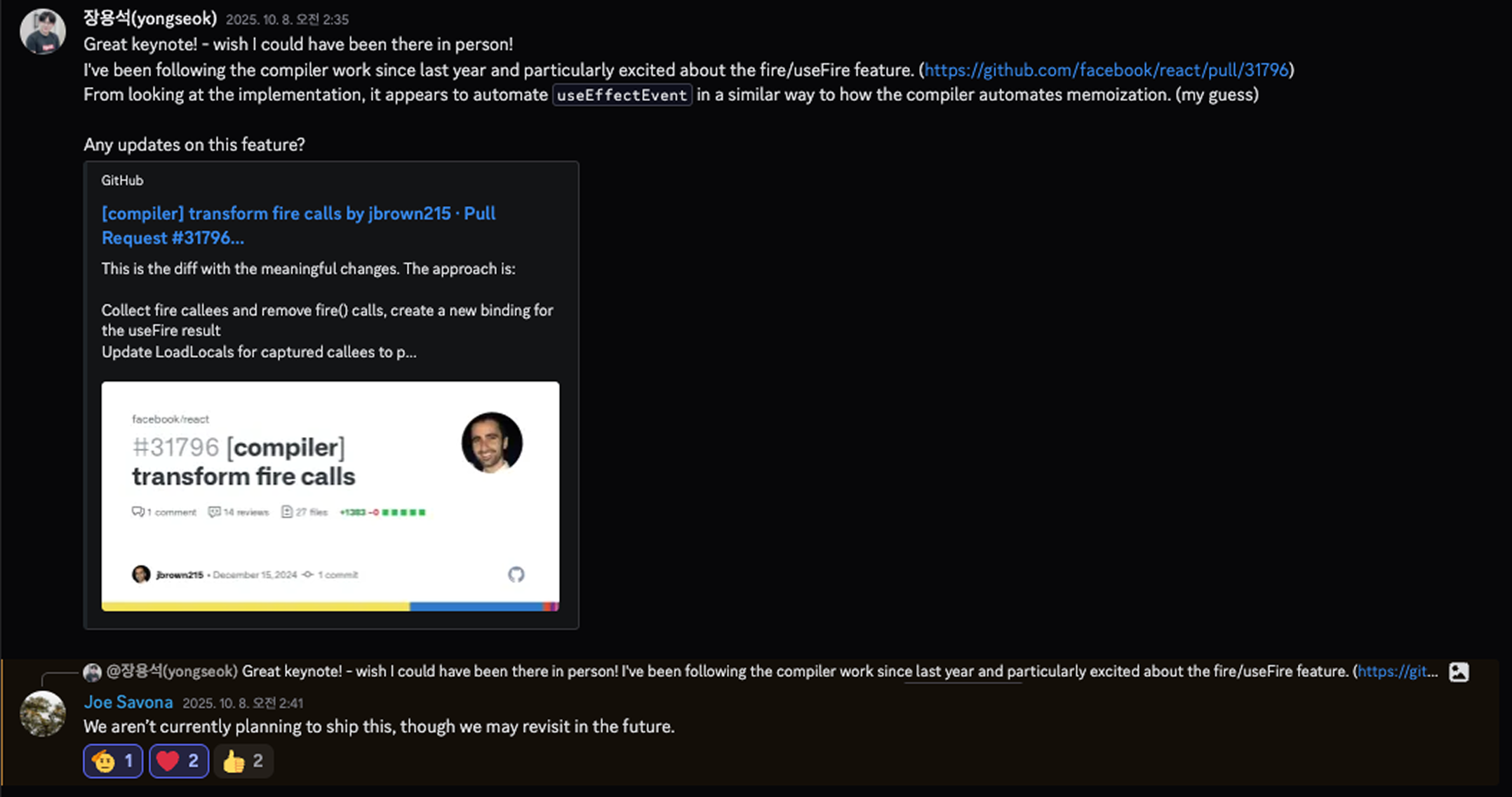
When I asked the React Team about future plans, it seems there aren’t any concrete ones yet
What is fire()?
fire() is a way to declare inside useEffect: “this function call is not a reason to re-run the Effect.” While useEffectEvent wraps a function at definition time, fire() marks it at the call site.
// @enableFire
import { fire } from "react";

function ChatRoom({ roomId, theme }) {
  const showMessage = () => {
    showToast(theme, `Connected to ${roomId}`);
  };

  useEffect(() => {
    const connection = createConnection(roomId);
    connection.on("connected", () => {
      fire(showMessage()); // Declare "this call is non-reactive"
    });
    connection.connect();
    return () => connection.disconnect();
  }, [roomId, showMessage]); // showMessage is in deps, but that's OK
}
The key idea: the developer just marks their intent with fire(), and the compiler handles the rest automatically.
useEffectEvent vs fire()
useEffectEvent approach (Manual)
function ChatRoom({ roomId, theme }) {
  // 1. Manually wrap with useEffectEvent
  const onConnected = useEffectEvent(() => {
    showToast(theme, "Connected");
  });

  useEffect(() => {
    const connection = createConnection(roomId);
    connection.on("connected", () => onConnected()); // 2. Call it
    connection.connect();
    return () => connection.disconnect();
  }, [roomId]); // 3. Manually manage dependencies
}
fire() approach (Automatic)
// @enableFire
import { fire } from "react";

function ChatRoom({ roomId, theme }) {
  // 1. Just a regular function
  const onConnected = () => {
    showToast(theme, "Connected");
  };

  useEffect(() => {
    const connection = createConnection(roomId);
    connection.on("connected", () => {
      fire(onConnected()); // 2. Just mark with fire()
    });
    connection.connect();
    return () => connection.disconnect();
  }, [roomId, onConnected]); // 3. Including in deps is OK
}
How fire() Works Under the Hood
React Compiler automatically transforms fire() into useFire(). If you think of useFire as essentially becoming useEffectEvent, the picture starts to come together.
What the developer writes:
// @enableFire
import { fire } from "react";

function Component({ props }) {
  const foo = (p) => console.log(p);

  useEffect(() => {
    fire(foo(props));
  }, [foo, props]);
}
What the compiler transforms it into:
import { useFire } from "react/compiler-runtime";

function Component({ props }) {
  const foo = _temp;

  // 1. Compiler automatically inserts useFire
  const t0 = useFire(foo);

  let t1;
  if ($[0] !== props || $[1] !== t0) {
    t1 = () => {
      t0(props); // 2. fire() removed, replaced with useFire result
    };
    $[0] = props;
    $[1] = t0;
    $[2] = t1;
  } else {
    t1 = $[2];
  }

  useEffect(t1, [props]); // 3. Dependency array auto-modified (foo removed!)
}

function _temp(p) {
  console.log(p);
}
What the compiler does:
fire(foo())→ inserts auseFire(foo)call- Removes
fire()and replaces it with theuseFireresult - Automatically removes fire functions from the dependency array
Automatic Dependency Array Management
The key advantage of fire() is that it automatically cleans up dependency arrays. This is possible since it has the compiler backing it.
Developer writes:  [foo, props]
                       ↓
Compiler output:   [props]  ← foo automatically removed!
Regarding this design, the React team explains in PR #32532:
“We landed on not including fire functions in dep arrays. They aren’t needed because all values returned from the useFire hook call will read from the same ref.”
The function returned by useFire() always references the same ref. The values read inside the function may change, but the function’s identity itself doesn’t. So there’s no need to include it in the dependency array, and the compiler knows this and excludes it automatically.
Difference from useEffectEvent:
// useEffectEvent - accidentally adding to deps triggers ESLint warning
useEffect(() => {
  onConnected();
}, [roomId, onConnected]); // ⚠️ ESLint warning

// fire() - even if added, the compiler removes it
useEffect(() => {
  fire(onConnected());
}, [roomId, onConnected]); // ✅ After compilation, only [roomId] remains
Constraints of fire()
fire() has rules to follow too — and they’re similar to what we’ve seen:
// ✅ Allowed: function call inside useEffect
useEffect(() => {
  fire(foo());
  fire(bar(a, b, c));
});

// ❌ Forbidden: using outside useEffect
function Component() {
  fire(foo()); // Error!
}

// ❌ Forbidden: method calls
fire(obj.method()); // Error!

// ❌ Forbidden: expressions that aren't function calls
fire(foo); // Error!
fire(foo() + bar()); // Error!
Current Implementation Status
fire() is still an experimental feature.
The React Compiler’s TransformFire pass is complete, but the actual useFire() runtime implementation doesn’t exist in the React codebase yet.
Unlike the compiler’s memoization process, fire requires the developer to manually wrap only the non-reactive parts within useEffect — which does take a bit more effort.
On the other hand, compared to the useEffectEvent approach that forces you to extract functions out, fire has the advantage of preserving colocation.
In the end, all this complexity is arguably the karma of the Effect paradigm itself.
fire() PR History
You can trace how fire() has evolved through its PRs:
| PR | Date | Description |
|---|---|---|
| #31796 | 2024-12 | Initial implementation (TransformFire.ts) |
| #31797 | 2024-12 | Add useFire import |
| #31798 | 2024-12 | Error handling for usage outside Effects |
| #31811 | 2024-12 | Automatic dependency array rewriting |
| #32532 | 2025-04 | Policy to exclude fire functions from deps |
If you want to experiment with it:
// babel.config.js
{
  plugins: [
    [
      "babel-plugin-react-compiler",
      {
        enableFire: true,
      },
    ],
  ];
}
Wrapping Up
Let’s recap the core principles:
- Problem: When an Effect doesn’t re-run, its closure stays captured with stale values
- Cause: JavaScript closures + React’s Effect reuse mechanism
- Solution: Indirect reference via a
{ impl: callback }object wrapper, withimplupdated during the commit phase
useEffectEvent gave us some breathing room for the complex cases that used to push developers into breaking useEffect’s rules.
That said, when you look at how it actually works, it does feel a bit like a workaround. As seasoning used in the right amount, it’s a very necessary feature — but if it gets overused where it’s not needed, predictability starts to blur.
I sometimes worry whether it might end up splitting the flow of logic into even more branches. In that sense, I’d conclude that it’s a form of black magic after all.
Will the Compiler fully solve this in the future? Looking at React’s broader direction, it does seem headed that way.